
Discounts and Offers
Which discount codes are giving away the most, and at which stores?
Discounts and Offers is where our system detects discount abuse and alerts you to it. It totals discounts for any day, week, fiscal period or year, ranks every code by dollars given away, and shows which stores used each one. Each store’s discount rate is printed with the dollars behind it.
How it works
How you work through it.
See the total for a day, a week, a fiscal period or a year.
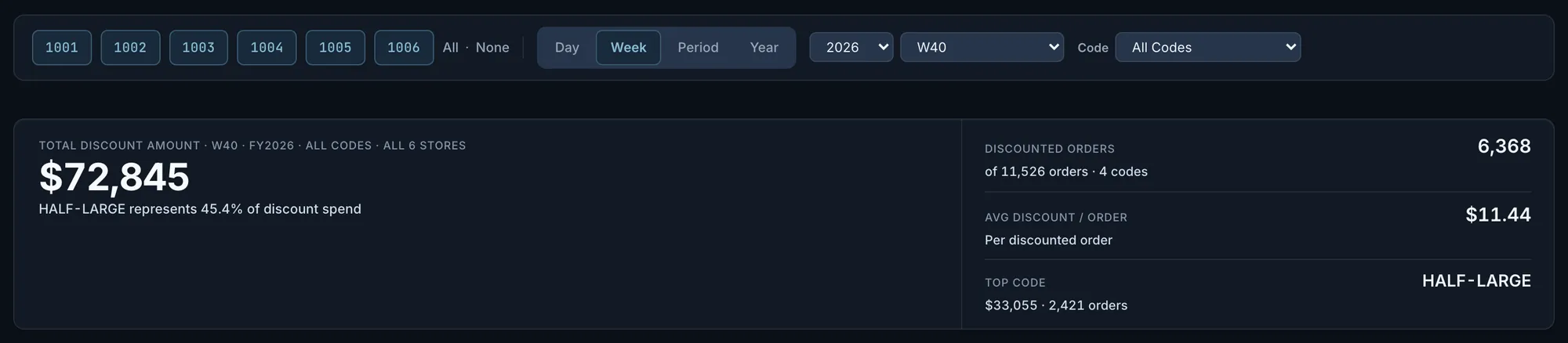
For all stores, some or one: total discount dollars, discounted orders counted once each out of all orders, the average per discounted order, and the top code with its share of the total. An open window is labelled in progress. A store that returns nothing shows a dash, not $0, and the total says how many stores reported.
Fig. 1$72,845 in discounts for the week, on 6,368 discounted orders. The top code is $33,055 of it, 45.4%.Actual OpsIntel screen · synthetic demo data Rank the codes.
Every code used in the window, in order of discount dollars, with its orders, average discount and share of all discounts.

Fig. 2Actual OpsIntel screen · synthetic demo data Open one code to see which stores used it.
How many times it was redeemed, on how many orders and at how many stores, then each store’s dollars, orders, average per order and share of that code. A code that sits mostly in one store is plain to see.
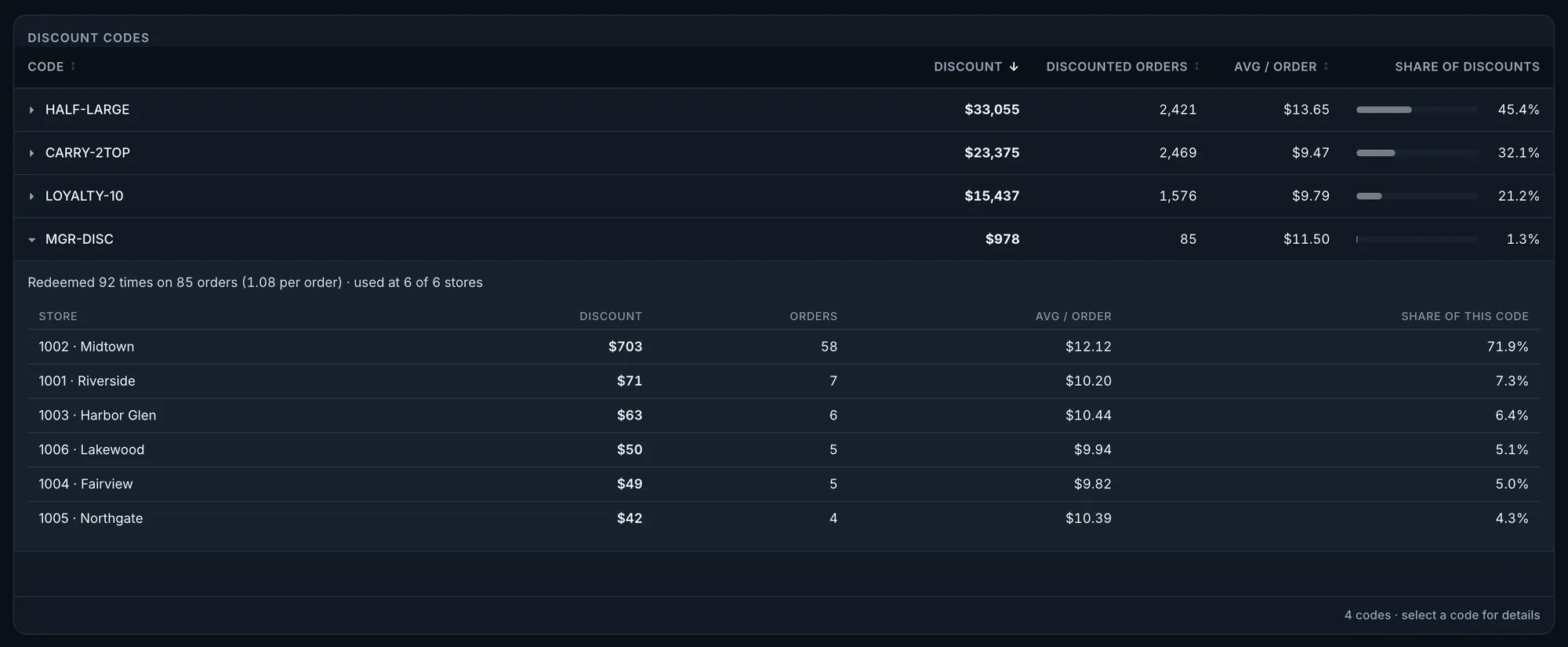
Fig. 3This code gave away $978. Midtown accounts for $703 of it, 71.9%.Actual OpsIntel screen · synthetic demo data Read the rate outside marketplaces beside the rate on all sales.
Marketplace orders carry almost no register discount, so the all-sales rate falls as marketplace share rises. The rate on gross sales outside marketplaces leaves them out. How this is calculated lists the discounts, the sales, the window, the stores and the date the data runs through, then each store’s rate on gross sales outside marketplaces with the dollars behind it. When two register reports disagree on a store’s discounts, the card names the store.
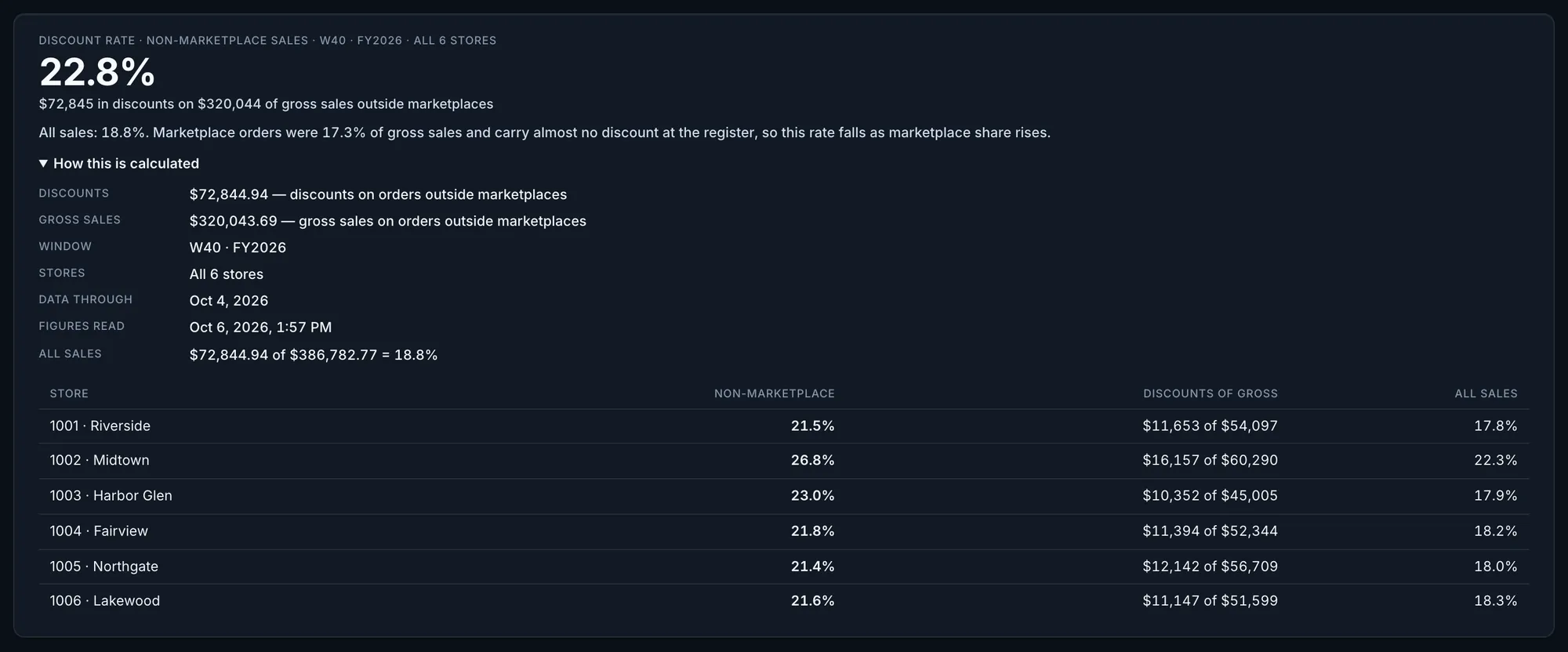
Fig. 422.8% on gross sales outside marketplaces and 18.8% on all sales for the week. Midtown’s row reads 26.8%, $16,157 of $60,290.Actual OpsIntel screen · synthetic demo data Look at one store on its own.
That store’s discount rate on gross sales outside marketplaces and its discount dollars for the last 14 days, 8 weeks or 6 periods, matching the view you are in.
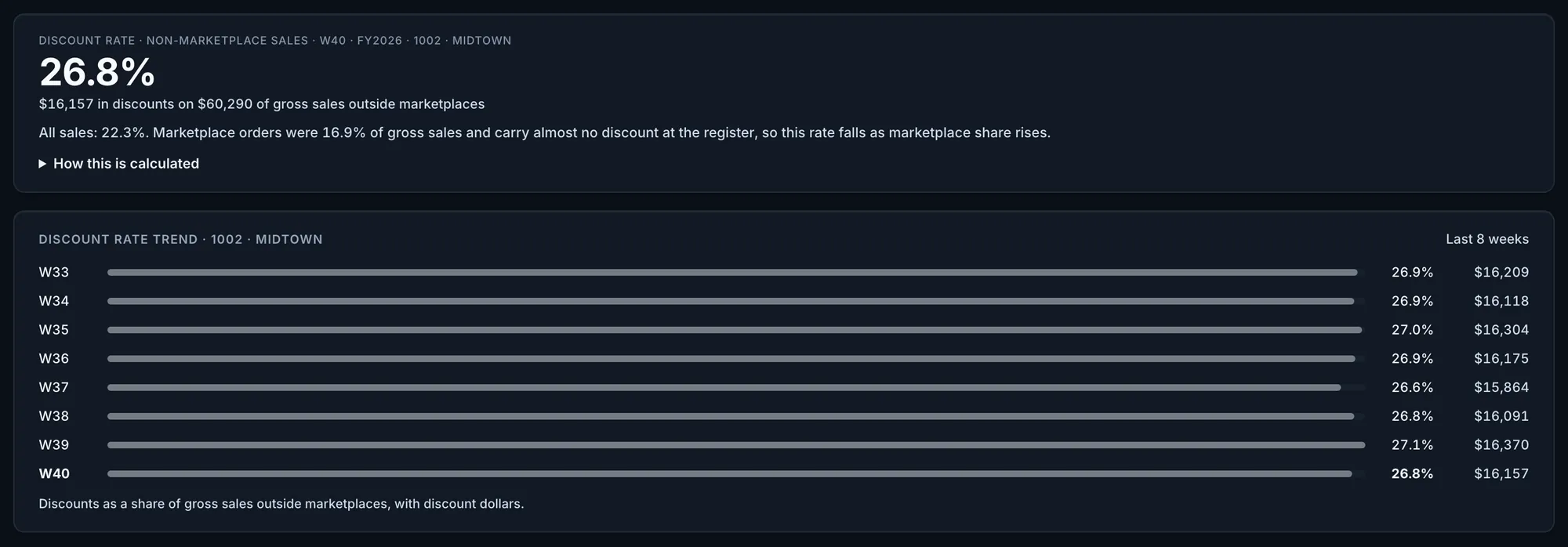
Fig. 5Midtown: 26.9% and $16,209 of discounts in week 33, 26.8% and $16,157 in week 40.Actual OpsIntel screen · synthetic demo data Compare sales with discounts over time.
In Trends, direct sales a day beside discounts a day, the discount rate on direct sales and the discount per direct order, across closed weeks or periods and against the same period last year. With two or more stores, each has its own card and a store where sales and discounts moved apart is marked. It states what moved, not why.
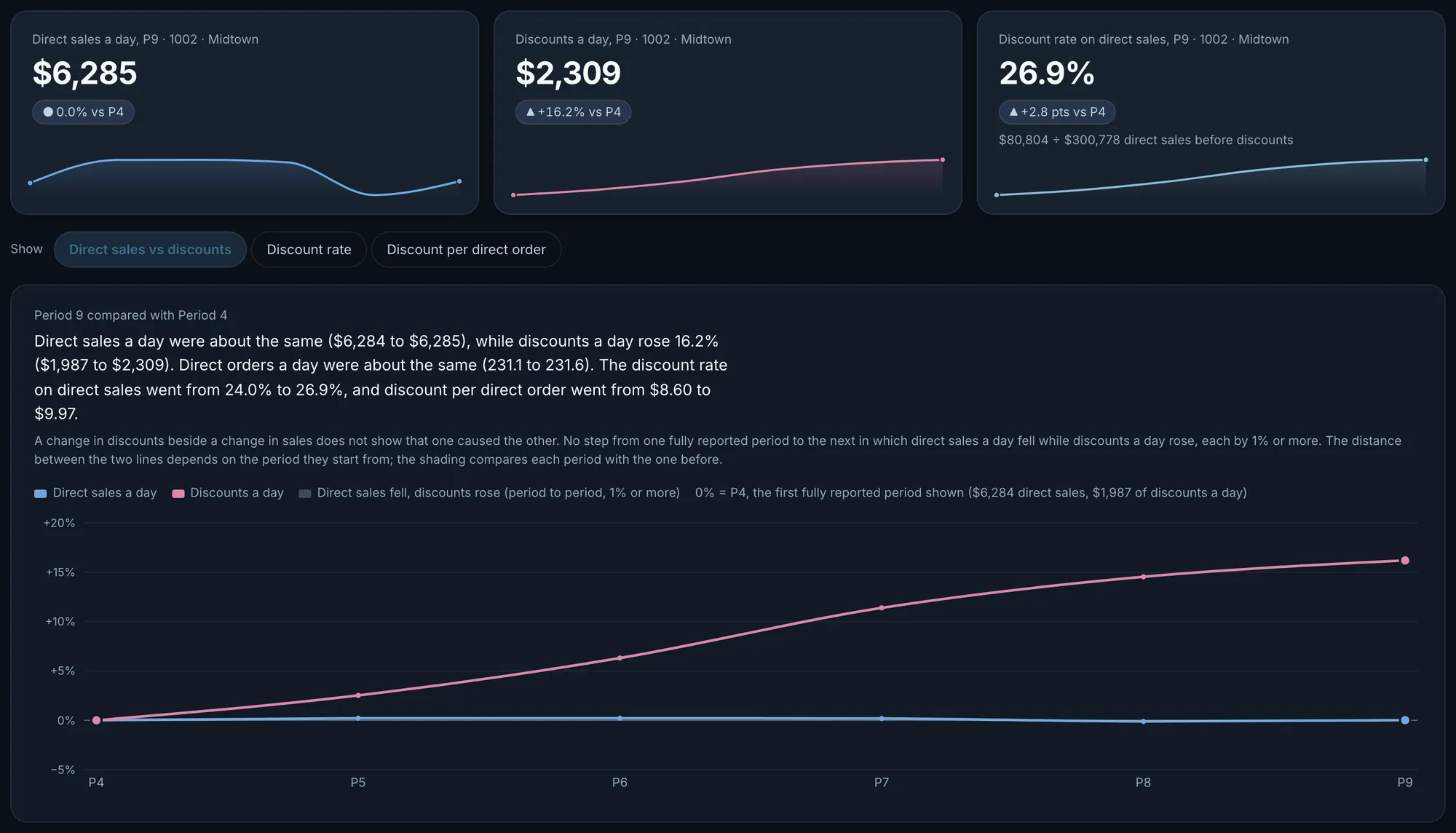
Fig. 6Midtown, period 9 against period 4: direct sales a day were about the same while discounts a day rose 16.2%. Discount per direct order went from $8.60 to $9.97.Actual OpsIntel screen · synthetic demo data
What it covers
Discounts and Offers at a glance.
Discount abuse detected for you: every offer code ranked by dollars given away, by store.
In Discounts and Offers
- Discount totals for any day, week, fiscal period or year
- Every offer code ranked by dollars given away
- Which stores used each code
- Each store’s discount rate, with the dollars behind it
- Discount abuse, with alerts
Before a demo
Worth knowing first.
- It shows what a code gave away. It does not say whether an offer made or lost money.
- Opening a code shows the stores that used it. Abuse is reported by code, store and shift, not by person.
- In the code table, an order with two codes appears under both. Orders that carry only the loyalty marker are listed on their own line and are not counted as discounted. Loyalty dollars are part of the total.
- The discount rate is read from the sales report, so its discount dollars can differ from the code total. A year view shows no data-through date.
- Discounts and Offers is on every plan. The Trends comparison is part of the Premium plan.
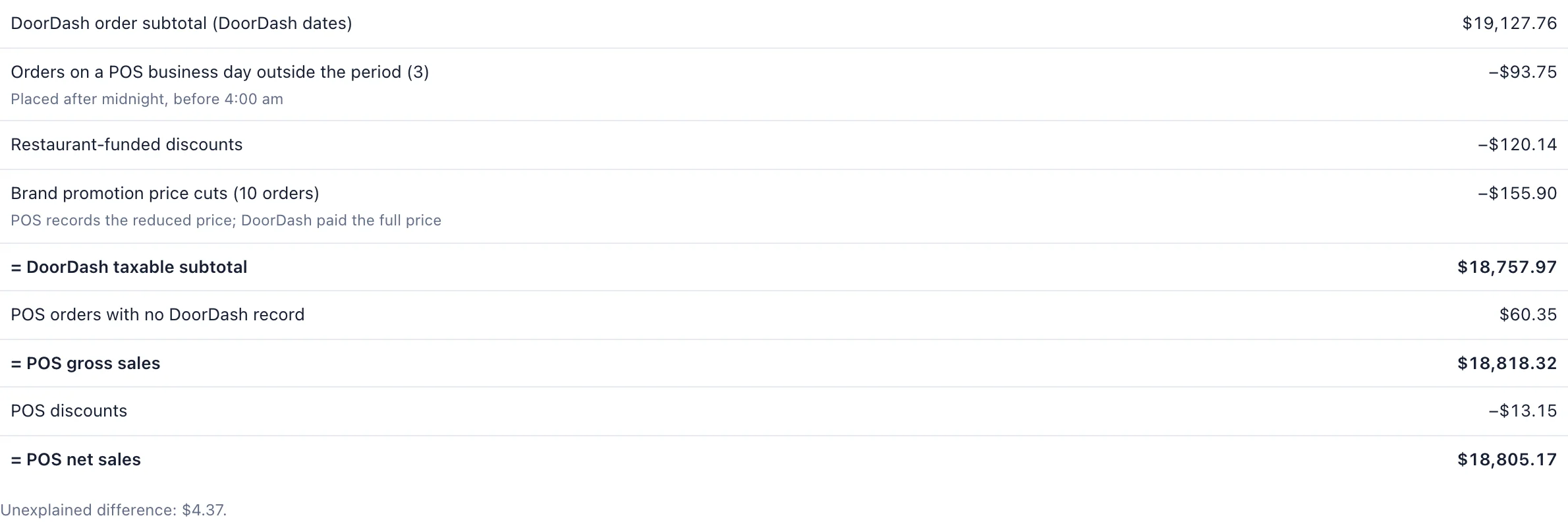
These are register figures. The offers you fund inside DoorDash and Uber Eats are read from each marketplace’s statement, and that has its own page. Marketplaces, step by step
Related
Read it beside these.
Actual OpsIntel screen · synthetic demo data Marketplaces
Marketplace statement analysis: DoorDash and Uber Eats statements beside what the register recorded.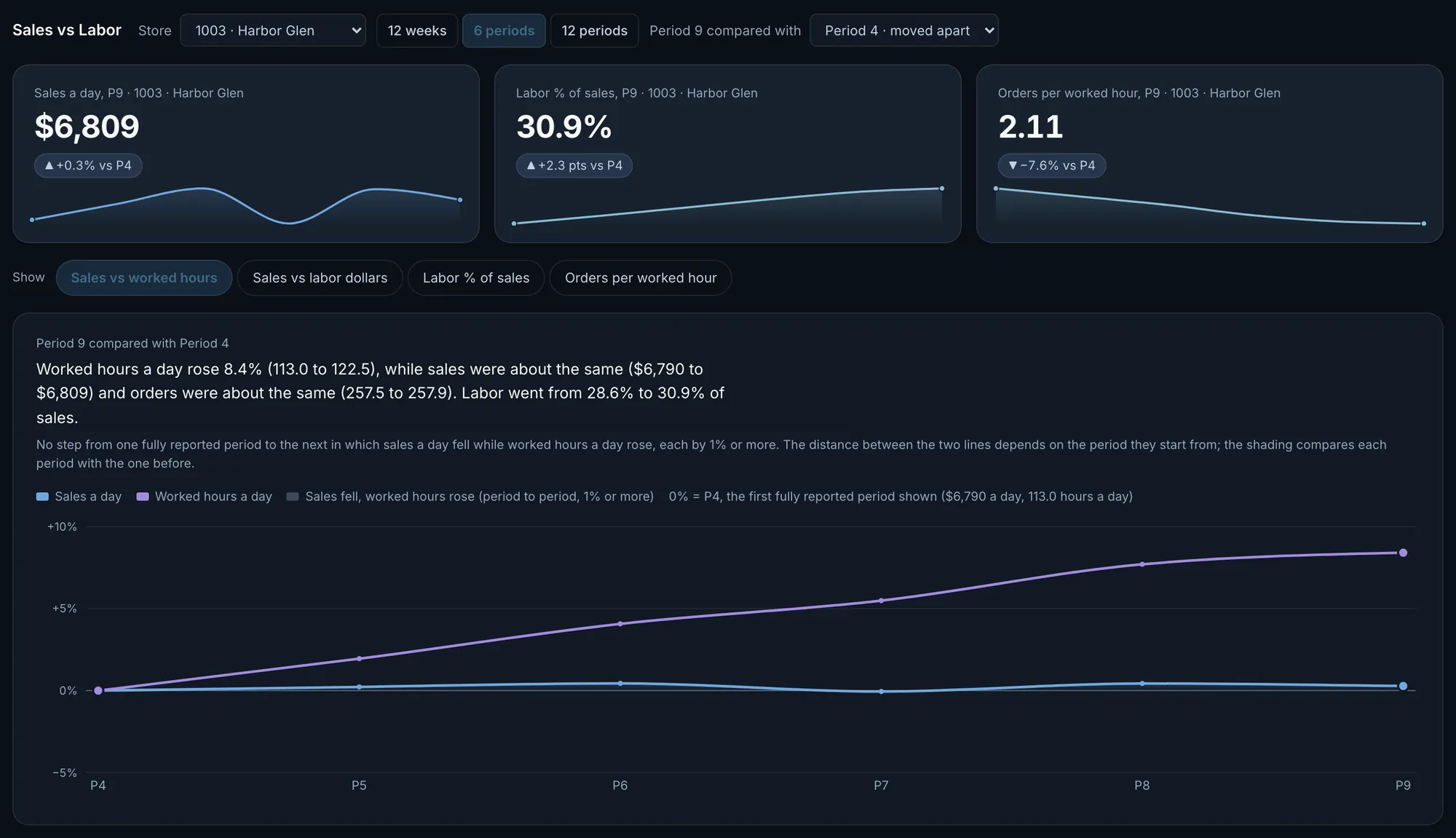
Actual OpsIntel screen · synthetic demo data Trends
See where the graphs are falling: sales, hours, channels, discounts and delivery times against the last few months.
