
Inventory
Where is food running over recipe?
Inventory tracks food waste and yields product by product, for each store, each day, along with inventory orders and transfers between stores. Our system puts what each store used beside what its recipes call for, in dollars, ranks the stores from most over to most under, and opens each store item by item.
How it works
How you work through it.
Pick a week and see all stores together.
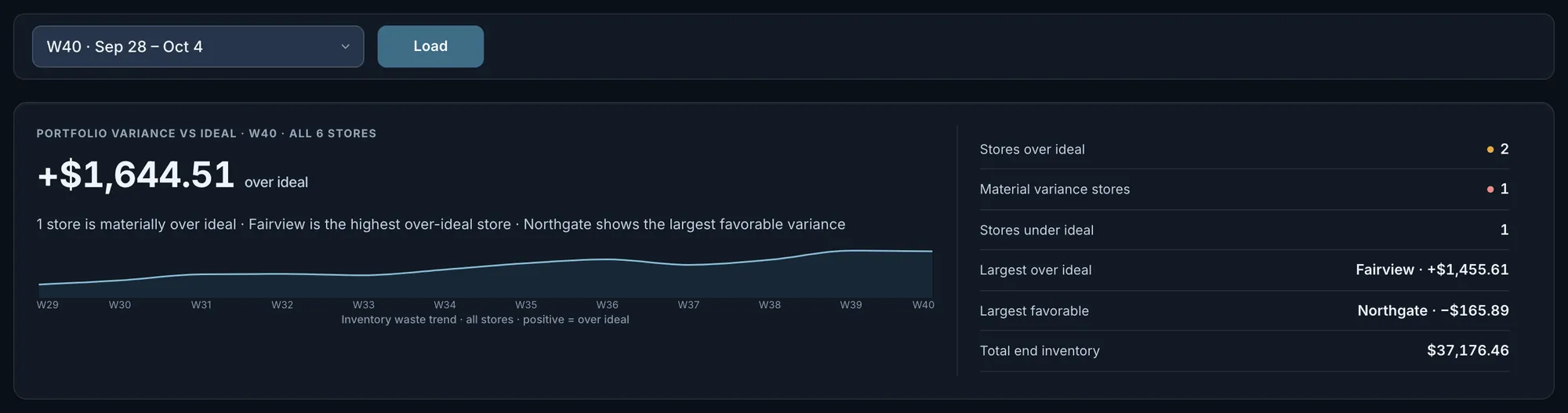
How far usage ran over or under recipe for the week you pick, in dollars, with a 12-week trend. The card says how many stores the total covers, counts the stores more than $100 over and more than $100 under, and names the largest of each. Weeks follow your franchise fiscal calendar and are listed with their dates.
Fig. 1All stores together ran $1,644.51 over recipe for the week, which the screen calls over ideal. The heading says the total covers every store.Actual OpsIntel screen · synthetic demo data Rank the stores.
Stores in order from most over recipe to most under, each with a status, actual cost, ideal cost and end inventory. A store with nothing recorded for the week is not shown as $0.00. It is listed with its previous week’s figures, labelled and left out of the picked week’s total, or as No counts when the previous week is empty too.
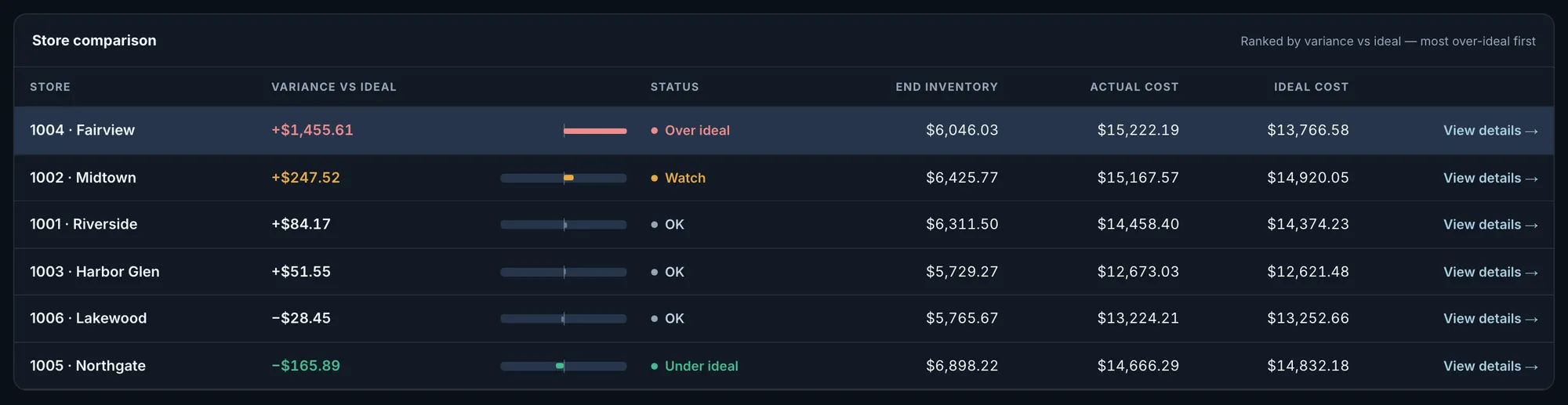
Fig. 2Fairview is $1,455.61 over ideal, most of the week’s total. The total is the sum of these rows.Actual OpsIntel screen · synthetic demo data Open one store’s week.
The store’s variance in dollars and as a percent of recipe cost, the items furthest from recipe, and the week as a count sheet in dollars: what it started with, what was delivered, what it used, what recipes called for and what was left. One line says whether usage ran more than 5% over recipe, more than 5% under, or within 5%. When it is more than 5% under, that line says a low food cost is not automatically a win and tells you to verify portioning and count entries.
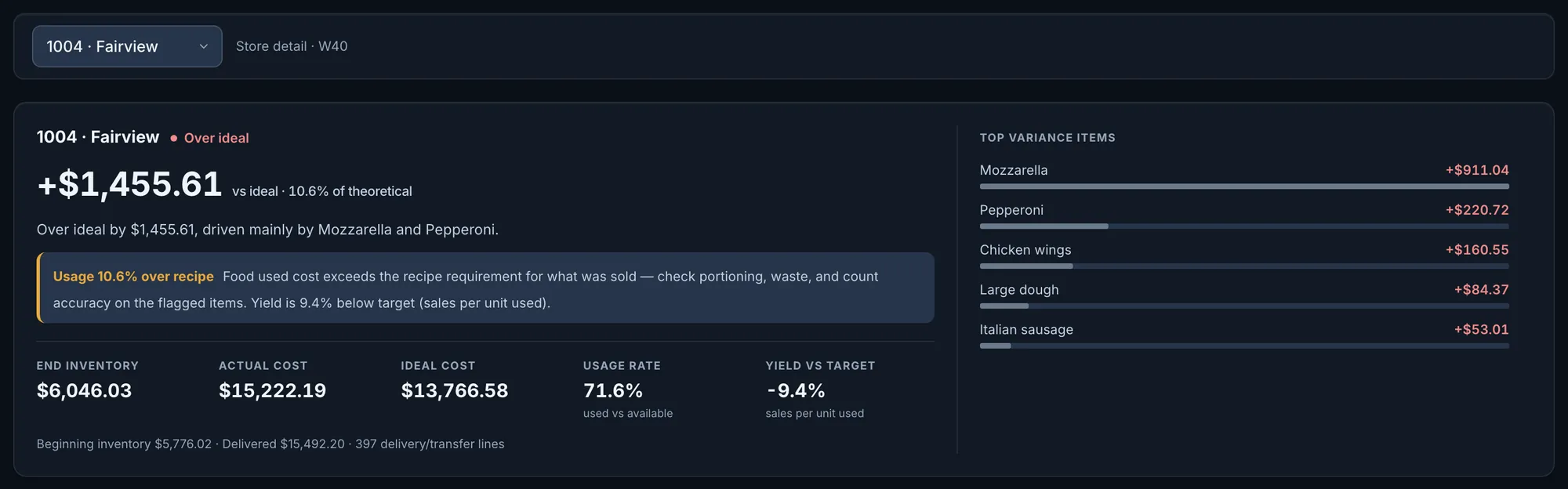
Fig. 3Fairview used $15,222.19 where its recipes called for $13,766.58. That is 10.6% over, and mozzarella and pepperoni are the two items furthest over.Actual OpsIntel screen · synthetic demo data Check each item’s count against what should be on the shelf.
Each item, largest variance first, with its dollars over or under recipe and its share of all item variance. Then the count trail, in the unit the store counts in: beginning count, delivered, recipe need, the count that was entered, and how far that count is from what should be on the shelf.
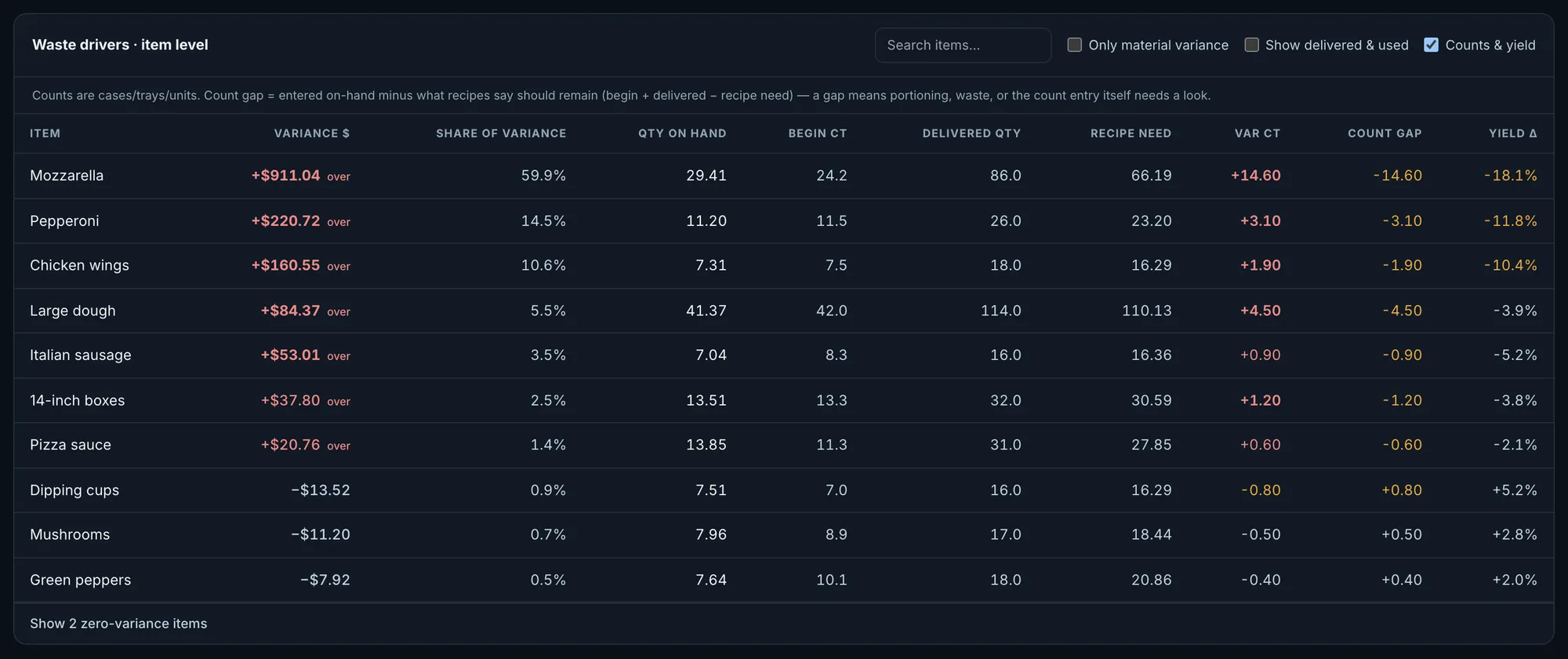
Fig. 4Mozzarella is $911.04 over. It began at 24.2, had 86.0 delivered and needed 66.19 for what was sold, so the count of 29.41 is 14.60 short of what should be on the shelf.Actual OpsIntel screen · synthetic demo data Show only items more than $20 over or under.
One tick hides every item within $20 of recipe, and another adds delivered and used dollars beside the counts. You can also search for an item by name.
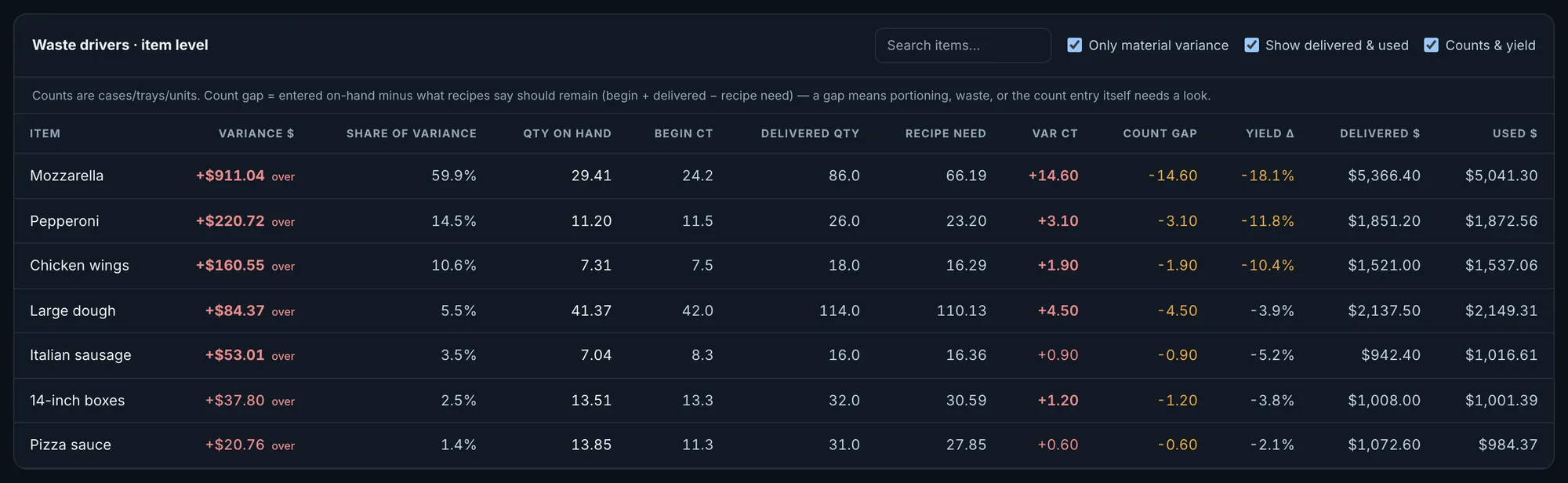
Fig. 5Actual OpsIntel screen · synthetic demo data
What it covers
Inventory at a glance.
Food waste and yields by product, store and day, with inventory orders and transfers.
In Inventory
- Food waste and yields, product by product
- What each store used beside what its recipes call for, in dollars
- Stores ranked from most over recipe to most under
- Each item’s count against what should be on the shelf
- Inventory orders and transfers between stores
Before a demo
Worth knowing first.
- The ranking against recipe is by week. You can open the current week, labelled as in progress, or any of the eight before it. The trend shows the twelve weeks ending at the week you pick, for all stores together.
- Food and paper are in one list. Boxes, cups and napkins sit beside cheese and dough, and store totals include all of them.
- It works by inventory item, not by menu item. It can tell you cheese ran over; it cannot tell you which pizza.
- The cutoffs are fixed and the same for every store: Watch above $100 over recipe, Over ideal above $500, Under ideal beyond $100 under, $20 either way for an item, and 5% either way for the line on a store’s week. Under ideal shows in green and is called favorable, even on a week the same card tells you to verify.
- Inventory is part of the Premium plan.
Related
Read it beside these.
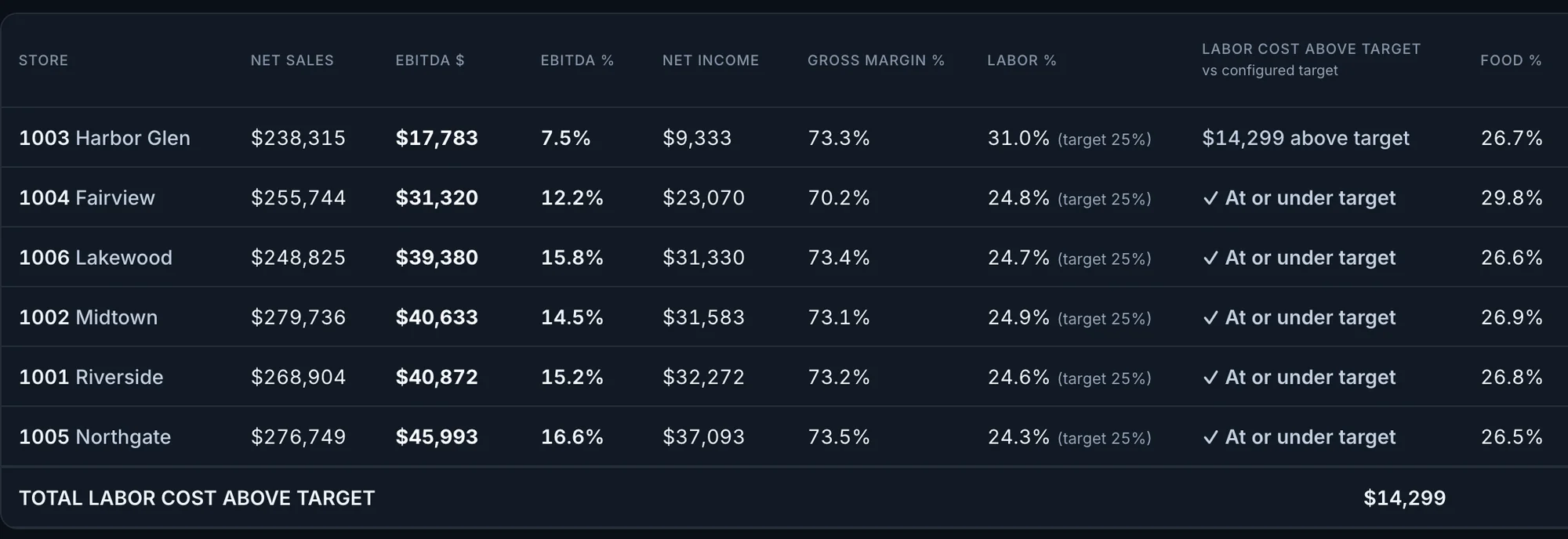
Actual OpsIntel screen · synthetic demo data P&L
The complete numbers: each store’s period side by side, with Xero and QuickBooks integration.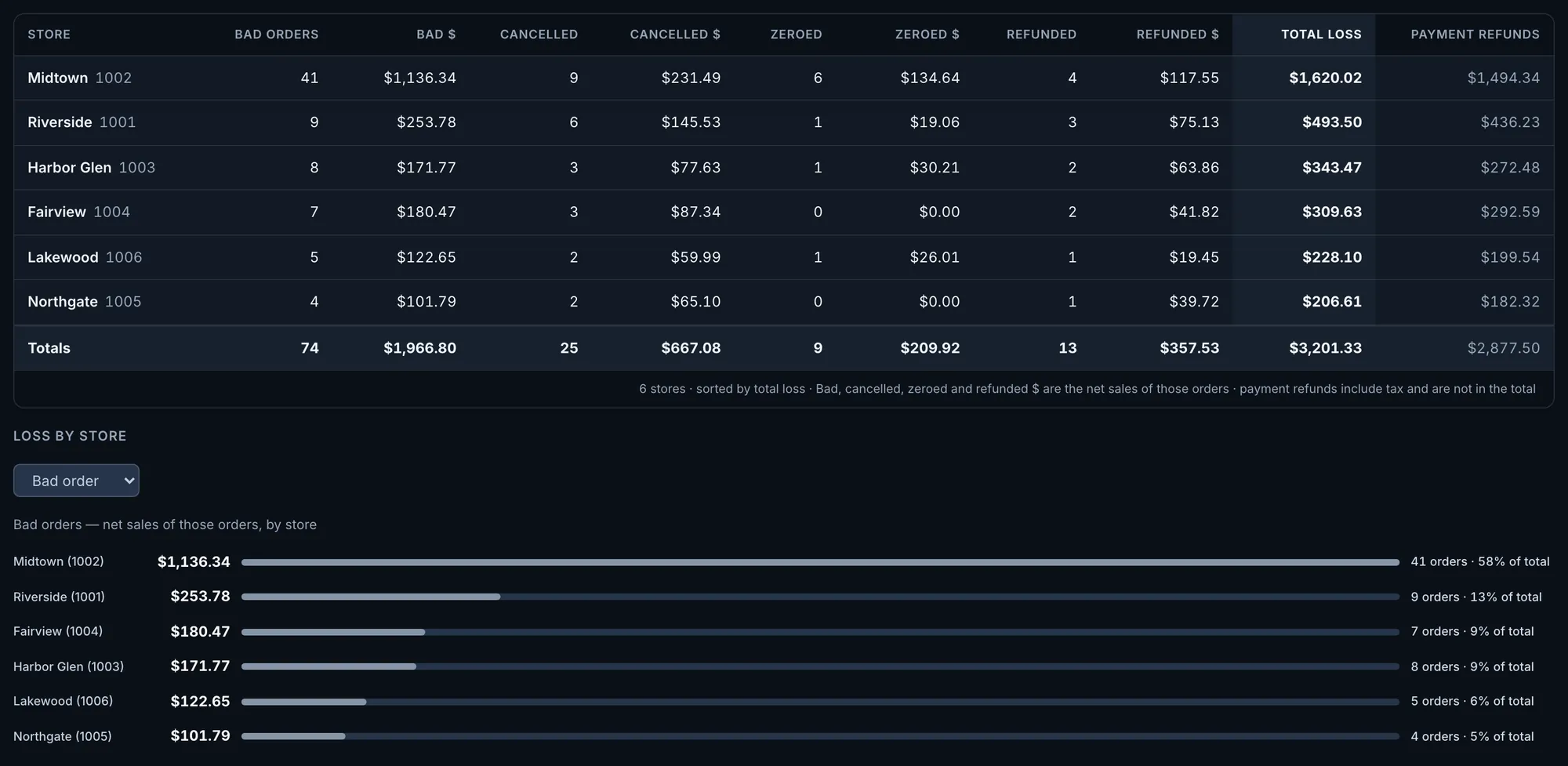
Actual OpsIntel screen · synthetic demo data Loss and Refunds
Fraud detection: voids, losses and refunds by store, and the ones that keep happening on the same shift.