
Loss and Refunds
Where are orders being voided, cancelled or refunded?
Loss and Refunds is where our system detects money leaking. It totals voided, cancelled, zeroed and refunded orders by store, finds the voids, losses and fraud patterns that keep happening on the same shift, and alerts you when one does. Payment refunds are shown beside the total and never added to it, because they are for the same orders.
How it works
How you work through it.
Open the last full week.
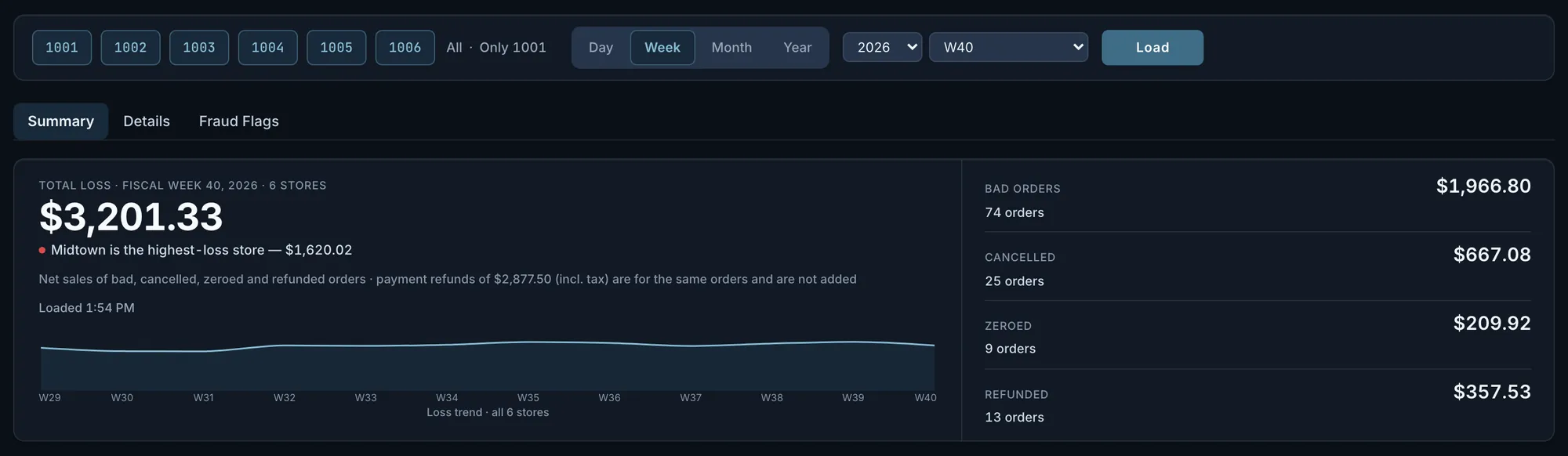
Loss and Refunds opens on the last completed fiscal week: one total for voided, cancelled, zeroed and refunded orders, the store with the most, and a 12-week trend whose last point is that total. Pick a day or a fiscal period and the trend covers the 10 days or 6 periods ending with it. A week still open is labelled in progress.
Fig. 1$3,201.33 for the week, half of it at Midtown. The $2,877.50 in payment refunds is printed under the total and not added.Actual OpsIntel screen · synthetic demo data Compare the stores.
Each store has counts and dollars for voided, cancelled and zeroed orders and dollars for refunded orders, sorted by total. Payment refunds sit in their own column outside the total, and a refunded-order count that does not arrive is shown as a dash, never as a zero. Below the table, pick an order type to rank the stores by its dollars, with each store’s order count and share of the total.
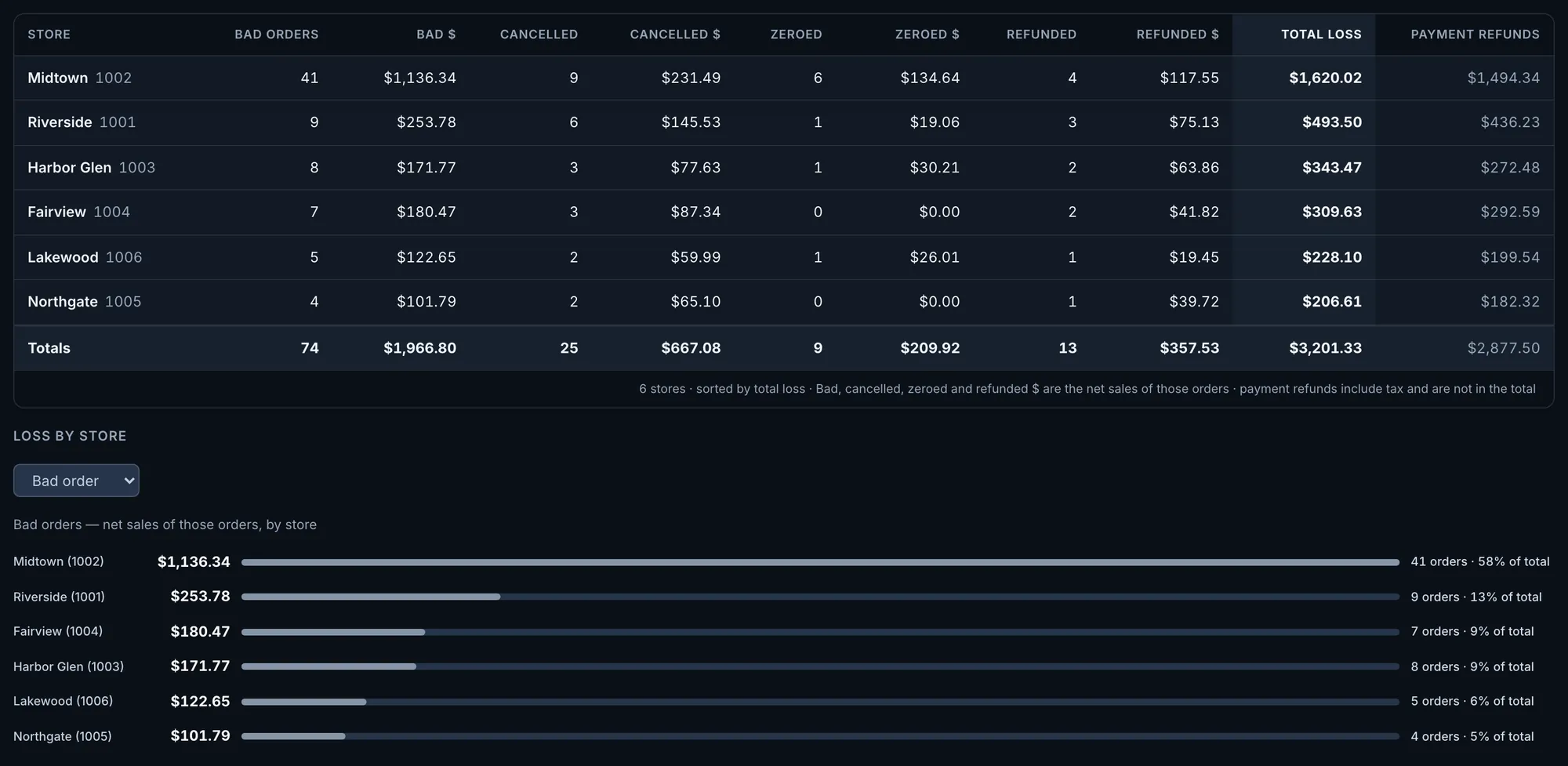
Fig. 2Midtown had 41 voided orders, which the screen labels as bad orders. The next store had nine.Actual OpsIntel screen · synthetic demo data Follow payment refunds to the order channel and the day.
Each order channel shows its payment refunds, the store-days that had a refund, all orders taken on the channel and refunds per $1,000 of that channel’s own sales. Below, the eight largest refund days each name the store and channel with the dollars refunded and the orders taken on that channel, and open that store’s orders for that date where the week has order detail. In a closed week the channels add up to the payment refunds on the summary. If the two differ, the screen prints both figures.
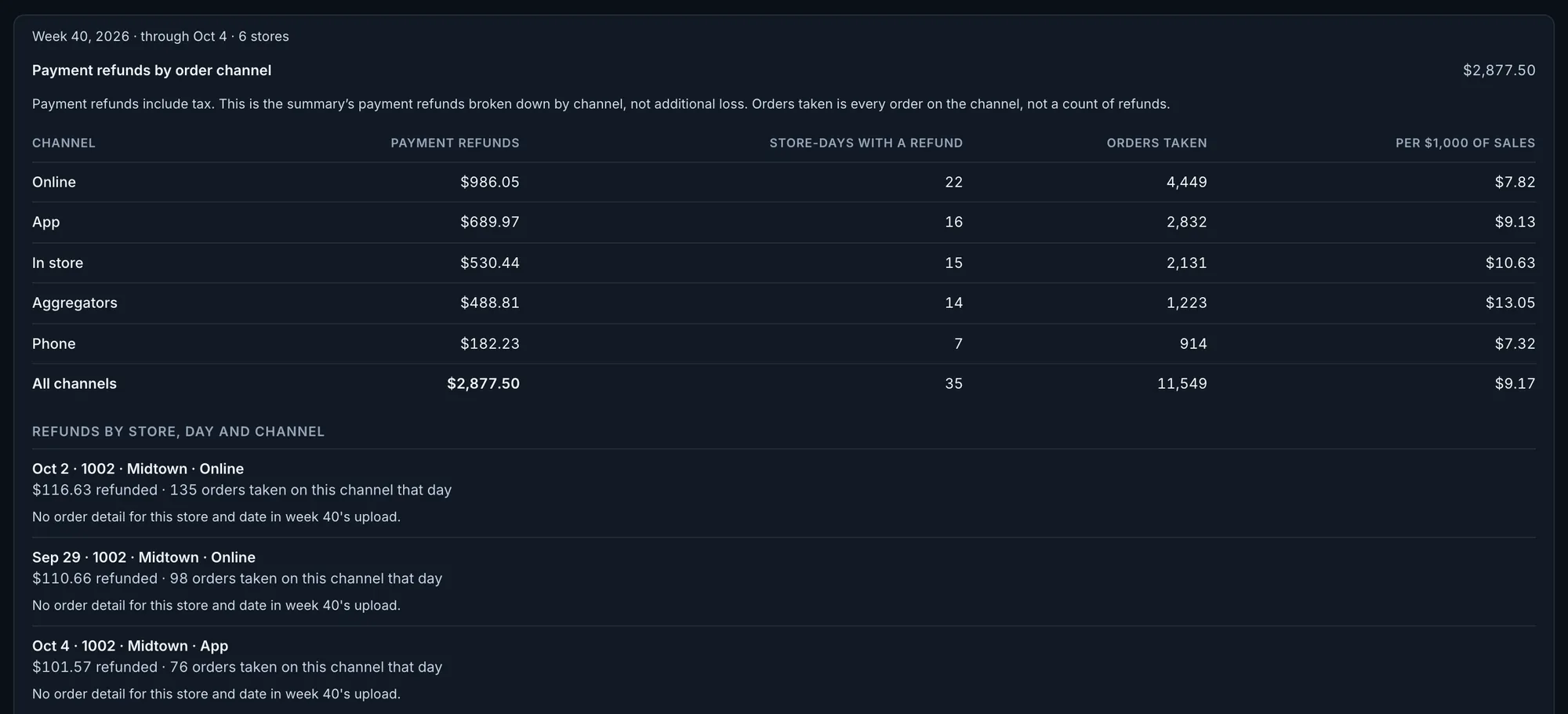
Fig. 3Online orders had $986.05 in payment refunds, $7.82 per $1,000 of sales. Aggregator orders had $488.81, $13.05 per $1,000.Actual OpsIntel screen · synthetic demo data Check cash days that were over or short.
Days a store’s cash was over or short by $100 or more are listed with the deposit recorded, once the seven days after them have closed. Large days that offset each other within seven days are paired off, and the screen says how many were paired off, what they left, and how many days it could not check yet. Reconcile each listed date against your closeout and deposit records.
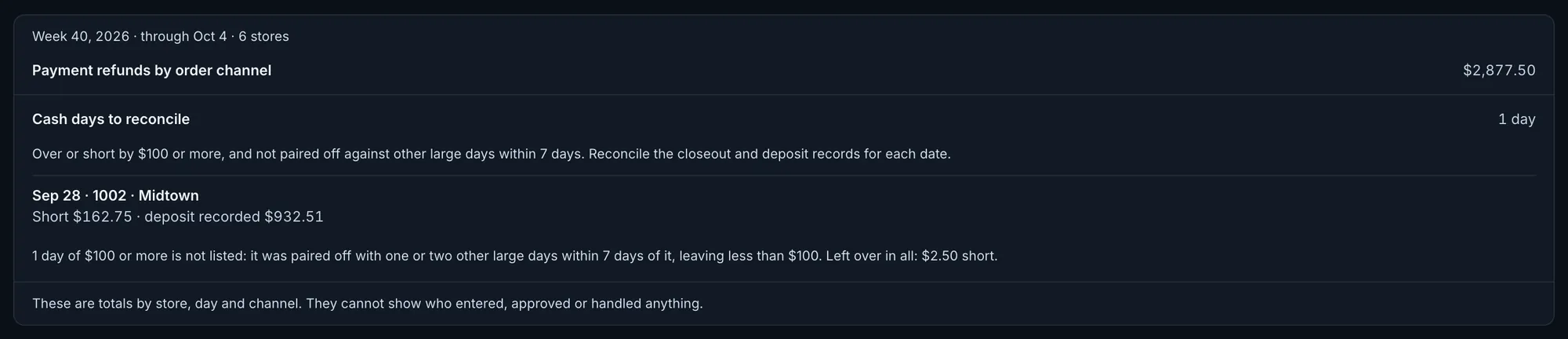
Fig. 4Midtown was short $162.75 on Sep 28, with a $932.51 deposit recorded. One more large day was paired off, leaving $2.50 short.Actual OpsIntel screen · synthetic demo data See which stores crossed the set amounts.
Three fixed amounts are printed at the top of the list, and each store that crossed one is shown with its own figure. A link on each store opens that store’s order detail, for weeks that have it.
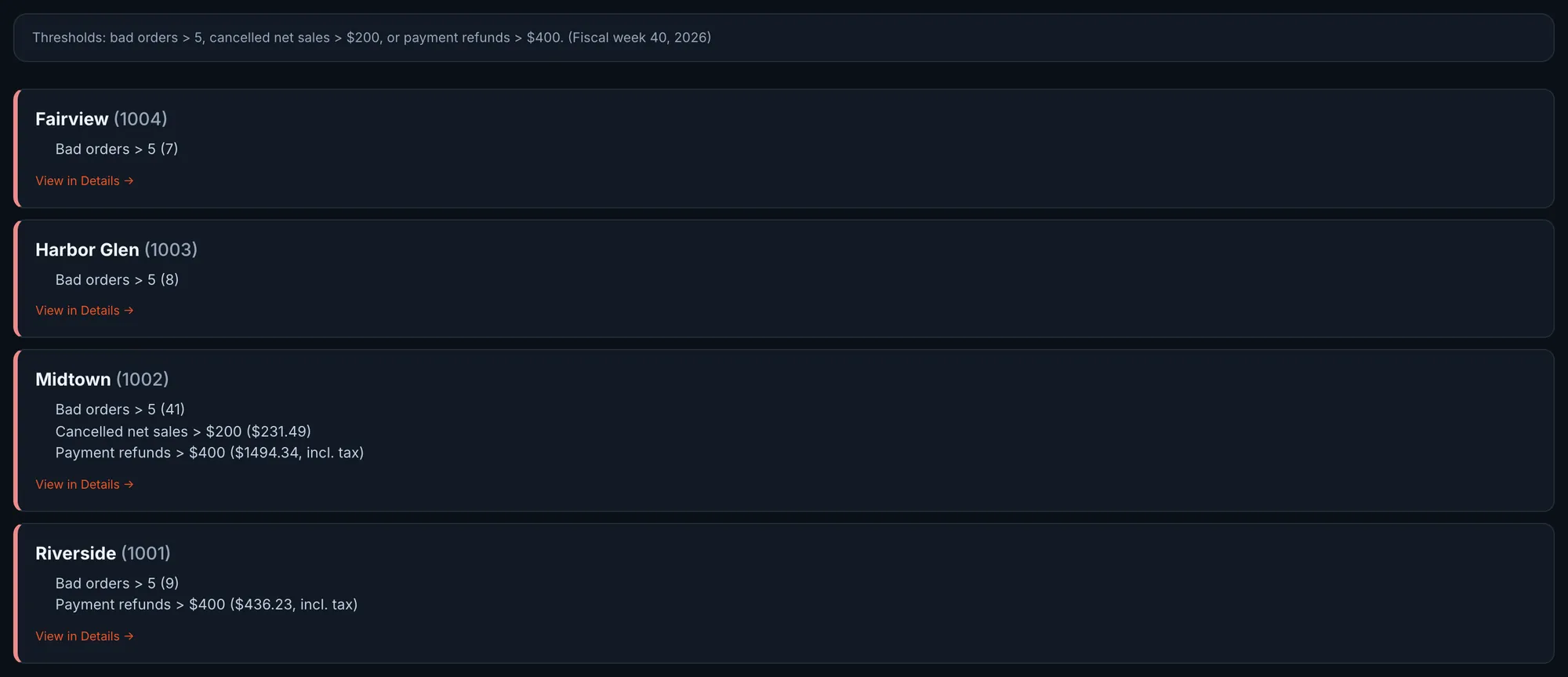
Fig. 5Midtown is over all three: 41 voided orders, $231.49 cancelled, $1,494.34 in payment refunds.Actual OpsIntel screen · synthetic demo data See the orders behind a week’s totals.
For a week that has order detail, the voided, cancelled, zeroed and refunded orders are listed with date, store, order number, type, recorded reason and amount. The same orders are grouped by the manager on duty recorded on each one, with the count and the dollars. That tells you which orders to pull, not what happened.
When a store returns no data.
Its row shows dashes in every column, the heading counts it, and the total covers only the stores with data. On the Premium plan, the list of stores over the set amounts and the refund and cash lists each say how many stores or store-days they could not check.
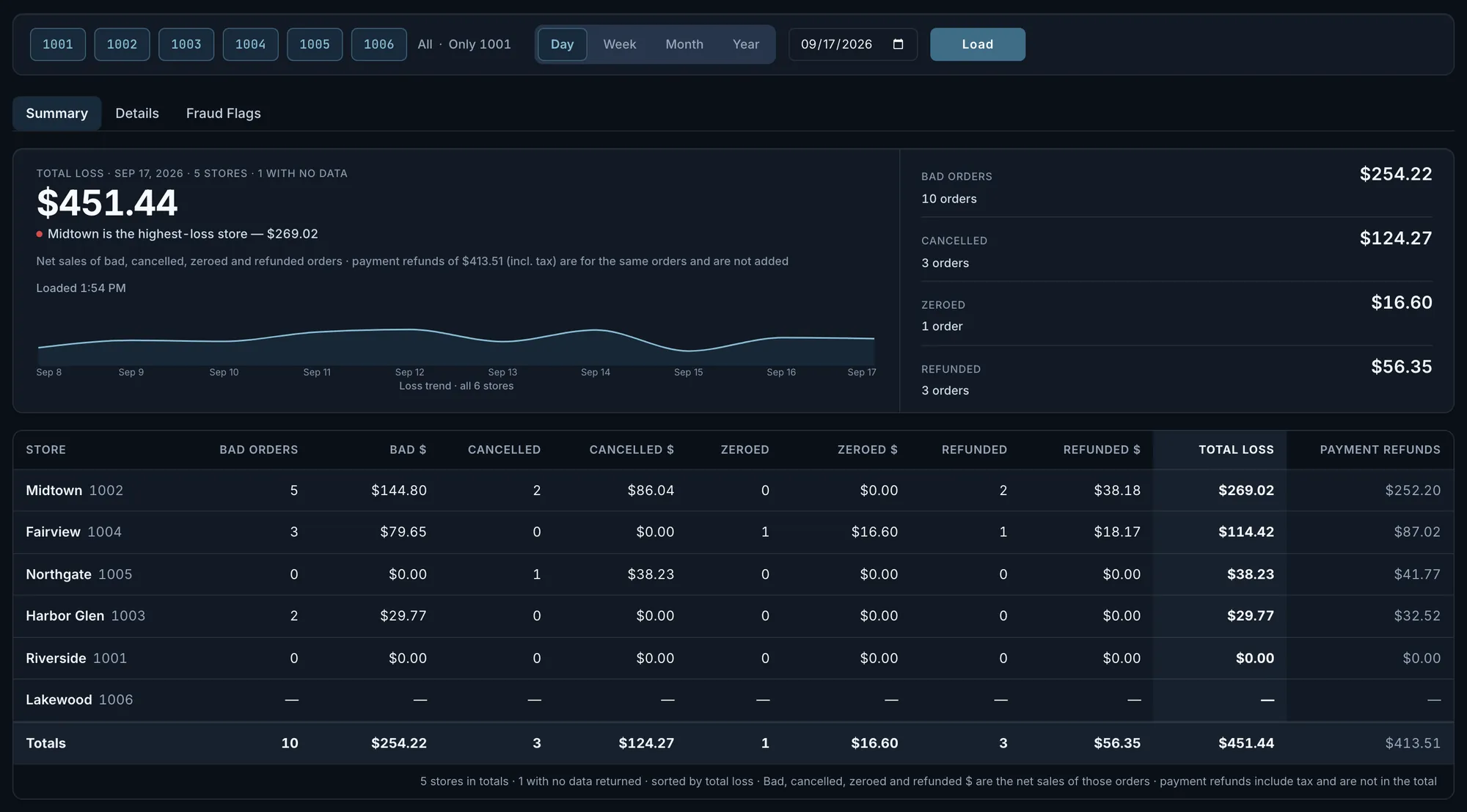
Fig. 6Lakewood’s row is all dashes. The heading and the footer both count one store with no data.Actual OpsIntel screen · synthetic demo data
What it covers
Loss and Refunds at a glance.
Fraud detection: voids, losses and refunds by store, and the ones that keep happening on the same shift.
In Loss and Refunds
- Voided, cancelled, zeroed and refunded orders, by store
- Voids and losses that keep happening on the same shift
- Payment refunds by order channel and day, never added to the total
- Cash days over or short by $100 or more
- Stores over the set amounts
- Alerts when a pattern repeats
Before a demo
Worth knowing first.
- The set amounts are fixed: more than 5 voided orders, $200 cancelled or $400 in payment refunds, the same for a day, a week, a period or a year. The $100 cash amount and the seven-day pairing window are fixed too.
- Order detail is kept by fiscal week.
- Only payment refunds are split by order channel, not voided, cancelled or zeroed orders. A year view shows them by channel only, without the days.
- Refunds by channel and cash days are totals by store, day and channel. Patterns are reported by store, day and shift, not by person.
- Refunds by channel and cash days are read for up to 48 stores in one account, for days that have closed.
- The summary is on every plan. Refunds by channel, cash days, order detail and the list of stores over the set amounts are part of the Premium plan.
Related
Read it beside these.
Actual OpsIntel screen · synthetic demo data Staff
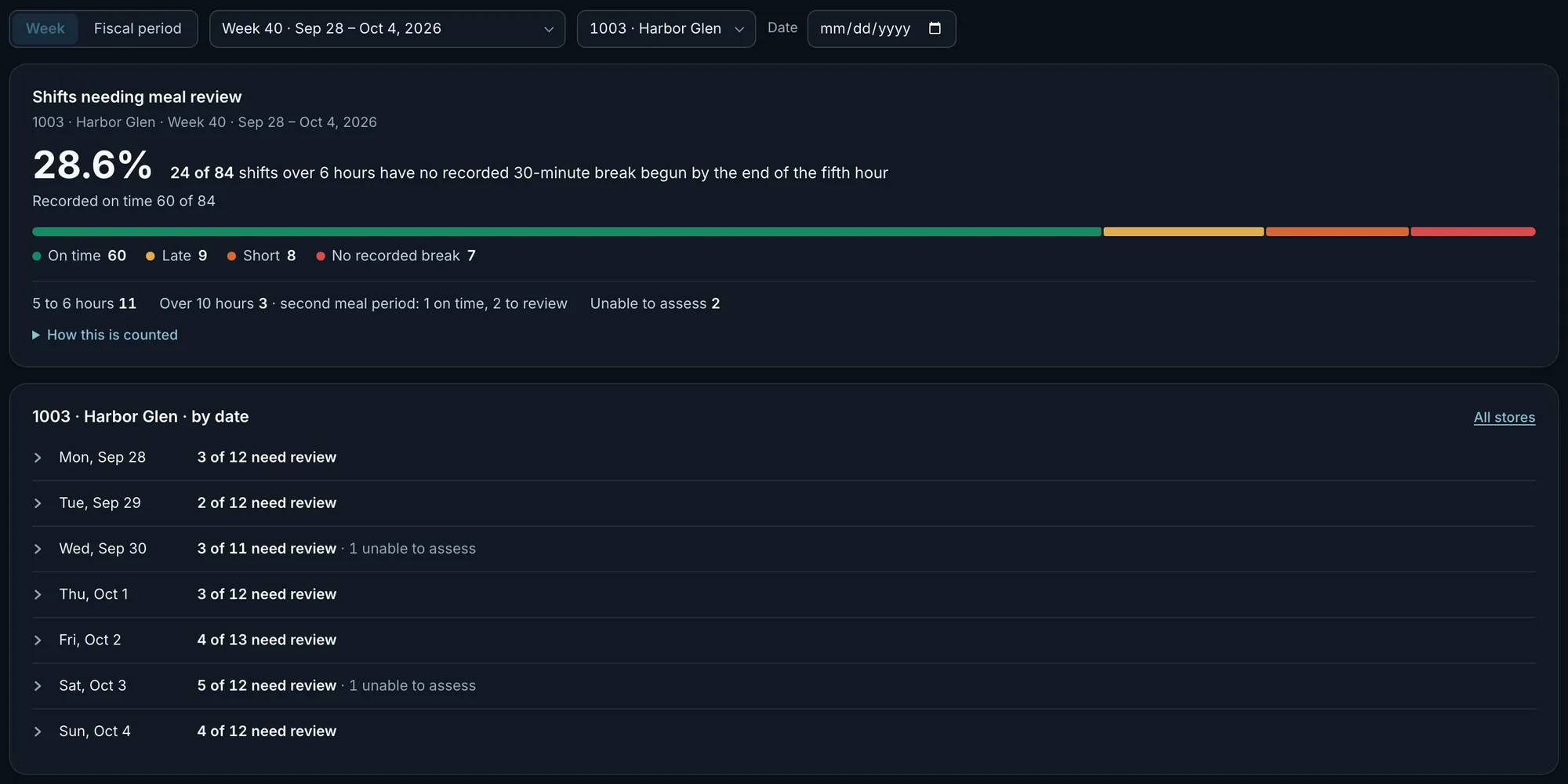
Labor compliance from time clocks, and time-clock manipulation, from all stores down to one shift.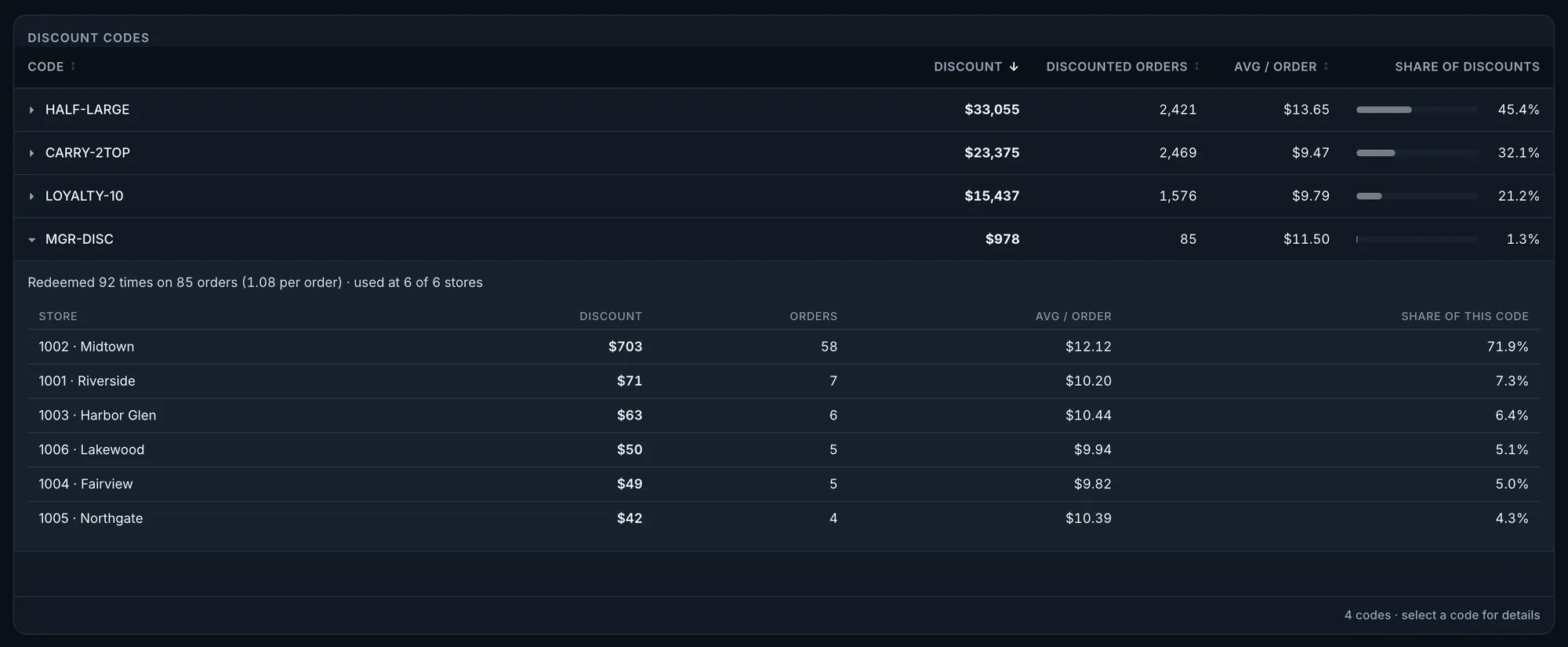
Actual OpsIntel screen · synthetic demo data Discounts and Offers
Discount abuse detected for you: every offer code ranked by dollars given away, by store.