
Do your marketplace statements tell the same story as your sales reports?
Marketplaces is statement analysis for DoorDash and Uber Eats. You provide your marketplace statements, and our system takes it from there. It sets what your register recorded beside what the statements say for a whole fiscal period, walks each DoorDash statement from the order subtotal to what the statement left, and names the reasons the two differ.
What it shows, step by step.
Start with what the register recorded.
For the period, the register’s net sales and order count on DoorDash, Uber Eats and Grubhub, for all stores or one. This is the operating baseline. It is counted on the register’s business day, a different date basis from a marketplace statement, so it is kept apart from the statement amounts under it.

The register’s net sales by marketplace: $99,855.66 on DoorDash, $47,590.49 on Uber Eats and $13,426.43 on Grubhub.Actual OpsIntel screen · synthetic demo data · tap to open full size Walk the DoorDash statement from order subtotal to what it left.
Each store’s DoorDash statement, and all stores together, to the cent: the order subtotal, commission, offers you funded, statement ad fees and other adjustments, with the sales tax DoorDash passed through taken back out. Under the walk, the deductions are stated as a share of the order subtotal, beside what DoorDash has marked paid and what it has not paid out yet.
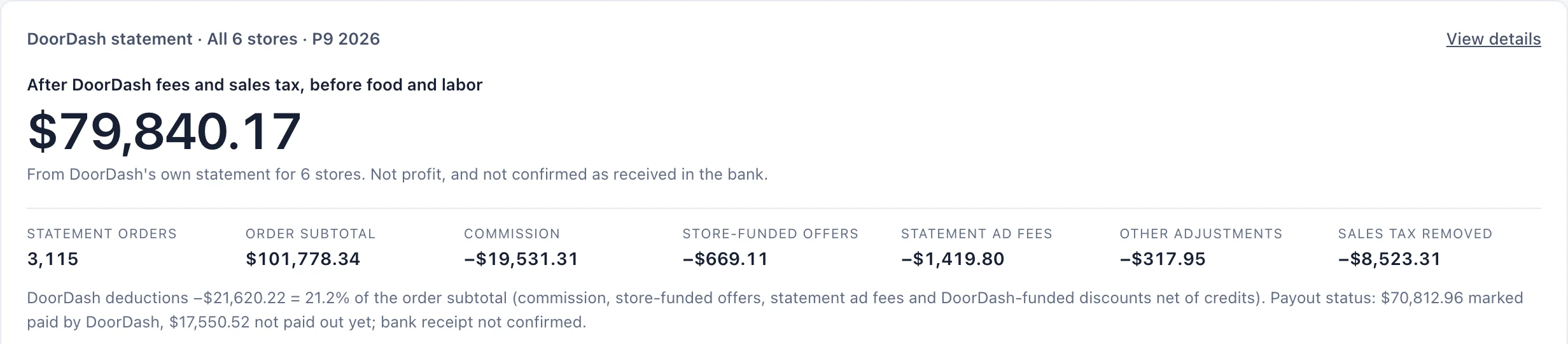
All stores, P9 2026: an order subtotal of $101,778.34, and $79,840.17 left after DoorDash fees and sales tax. Commission is the largest line, $19,531.31.Actual OpsIntel screen · synthetic demo data · tap to open full size Set the statement beside the register, line by line.
For one store, the DoorDash order subtotal is carried to the register’s net sales through named lines: orders that fall on a register business day outside the period, discounts you funded, brand promotion price cuts where the register records the reduced price, register orders with no DoorDash record, and register discounts. What is left over is printed as an unexplained difference. It is not folded into another line.
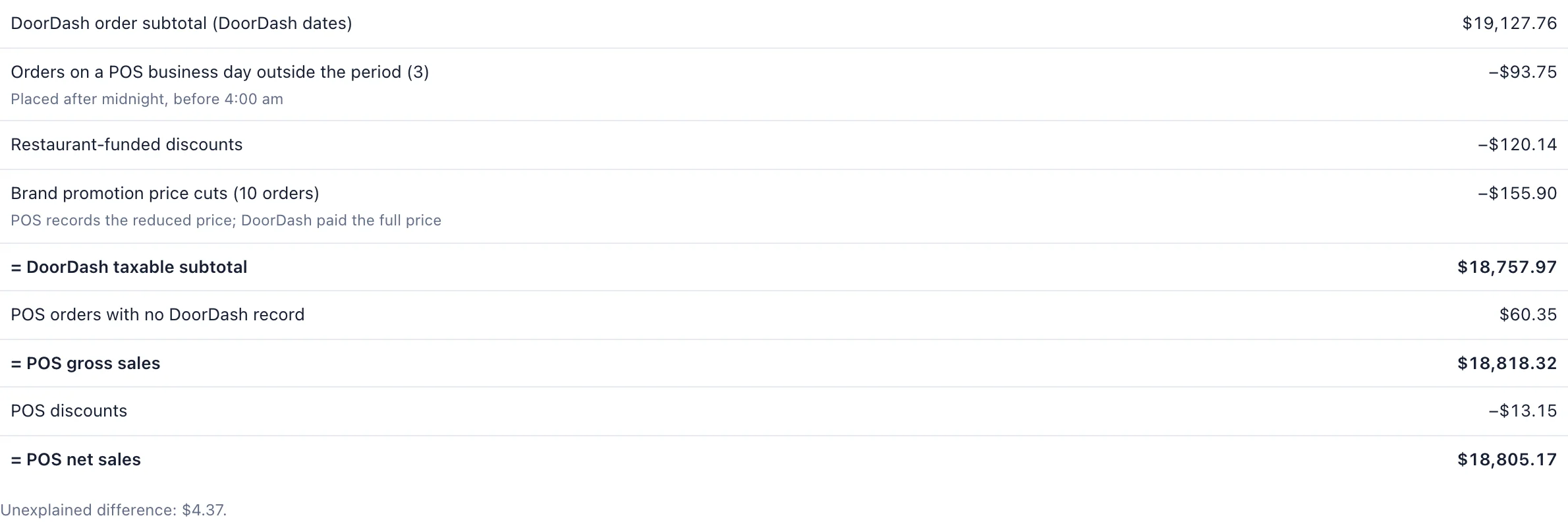
One store: a DoorDash order subtotal of $19,127.76 and register net sales of $18,805.17. After the named lines, $4.37 is unexplained.Actual OpsIntel screen · synthetic demo data · tap to open full size See which store stands out on deductions.
Every store in one table: register marketplace sales, DoorDash statement orders, the deduction rate, the amount after fees and tax, and the number of open items. The statement columns can be compared between stores. A store whose deduction rate stands apart from the group’s median is listed under Needs attention with its largest component named. The screen states the rate. It does not give a reason.
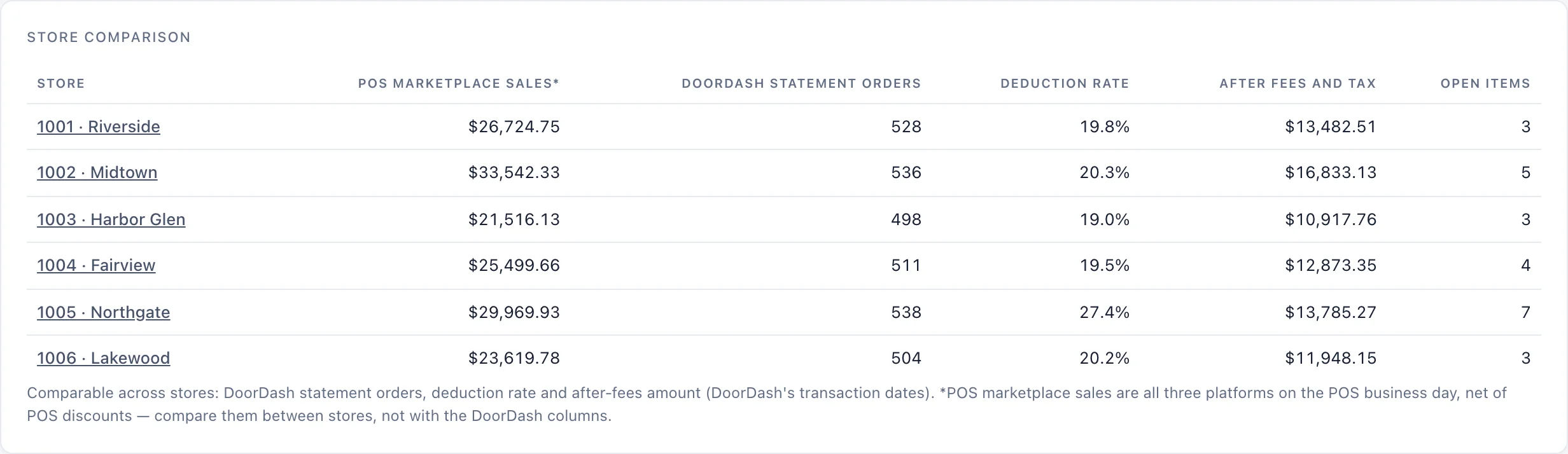
Northgate’s deduction rate is 27.4%. The other five stores read between 19.0% and 20.3%.Actual OpsIntel screen · synthetic demo data · tap to open full size Follow error charges and later adjustments across periods.
What DoorDash charged for missing or incorrect items and for cancellations is listed by order: what was charged, what has been credited and what is still open. A credit dated after the period ends is shown under Resolved later, and is counted in its own period’s statement.
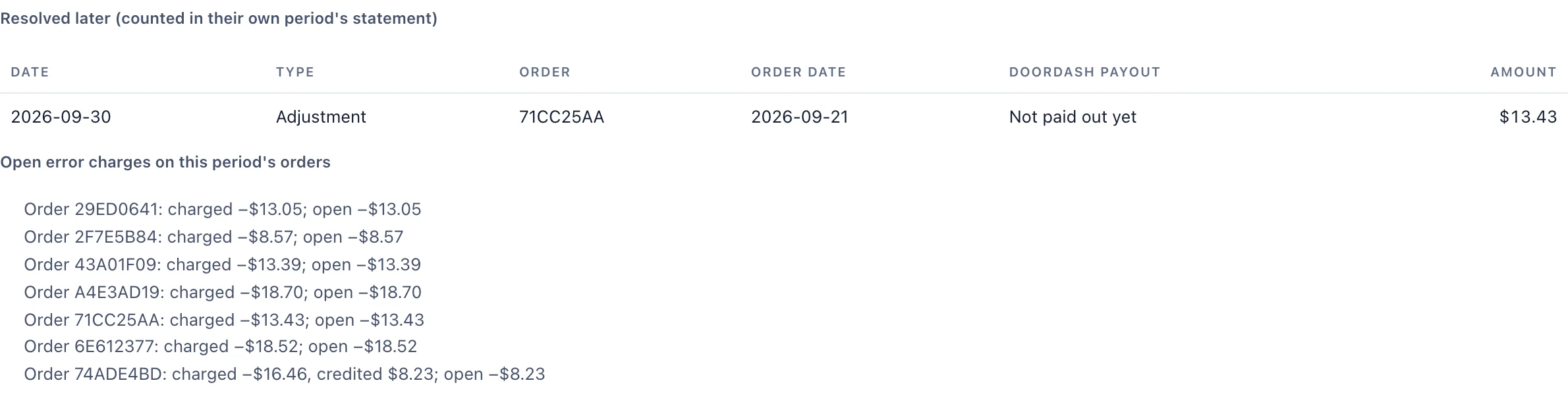
Order 74ADE4BD was charged $16.46 and credited $8.23, so $8.23 is still open. A $13.43 adjustment dated 2026-09-30 is for an order of 2026-09-21.Actual OpsIntel screen · synthetic demo data · tap to open full size Check Uber Eats payouts against Uber’s own payout summary.
Uber Eats has its own statement. For each weekly payout, the payment detail rows with that payout’s reference are totalled and set beside Uber’s payout summary row, with the order counts. Each payout reads as matching to the cent, or as a mismatch with the difference printed.
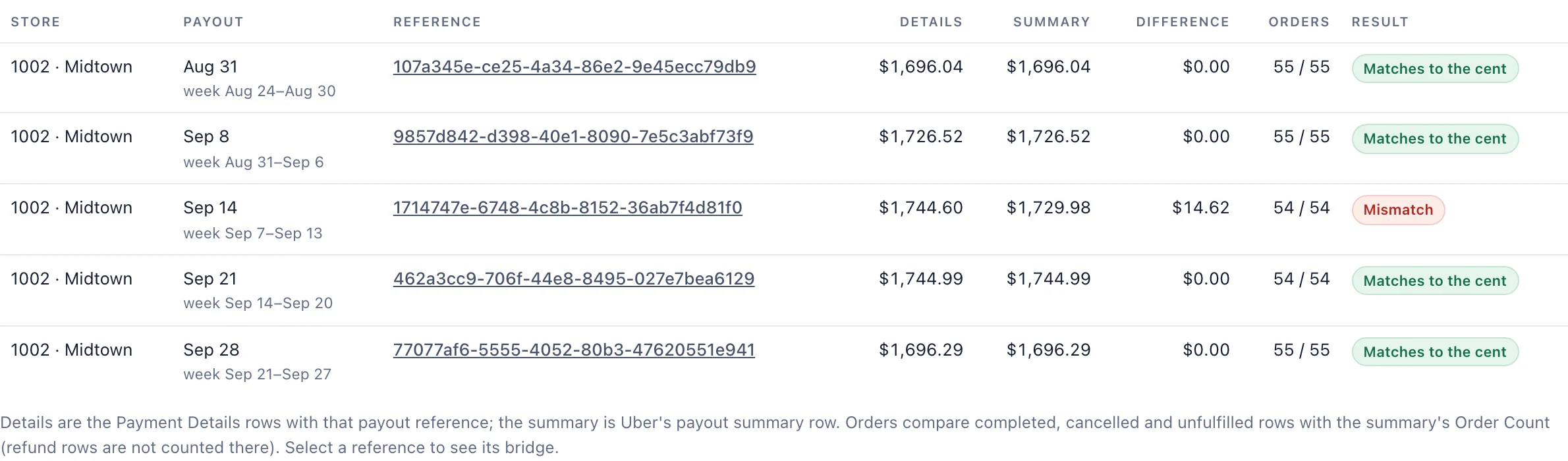
Midtown: four payouts match to the cent. The Sep 14 payout reads $1,744.60 in the details and $1,729.98 in the summary, a difference of $14.62.Actual OpsIntel screen · synthetic demo data · tap to open full size Read a written summary of the page’s figures.
Press Explain these results for a written summary of the figures on the page. The summary is written by AI, so read it beside the figures it describes.
Worth knowing first.
- It ends at what the statement left, before food and labor. That is not profit.
- It does not confirm money received in the bank. It shows what the marketplace has marked paid and what it has not paid out yet.
- DoorDash campaigns are matched to the statement by date and amounts, with what you funded beside what DoorDash funded. None is ranked, and none is said to have worked. Ads run by the brand are not matched.
- The statement walk and the comparison with the register are DoorDash. Uber Eats has its own statement and payout check. Grubhub appears as register sales only.
- It works on whole fiscal periods, and a statement is matched to your stores by the store number on the statement.
- Only owners and admins see it.
- In the product it is the Aggregators tab of Discounts and Offers, and it is included with Discounts and Offers on every plan.
See it on the live product.
A demo is thirty minutes.