OpsIntel was built on our own restaurants first. These are four things the numbers showed us, and how we use the product each week. No figure on this page is from our restaurants: the screens are the real product on invented data.
Two questions, and where each one shows.
01 · Marketplace deductions
Do our marketplace statements tell the same story as our sales reports?
What stood out
On sales, the statement and our own reports agreed closely. On what was taken out before the payout, they did not, and the difference had to be read line by line.
A marketplace keeps its own dates and takes out commission, the offers the store funded, ad fees and adjustments before it pays. The register records the sale, not what is taken out of it. So we set the two beside each other for a whole fiscal period, with every reason they can differ on its own line: orders after midnight that fall on another business day, offers we funded, price cuts on brand promotions, and orders the register has that the statement does not. Whatever no line accounts for is printed as an unexplained difference.
The next check
Open the store that stands out and read its statement beside the register: commission, the offers it funded, ad fees and adjustments.
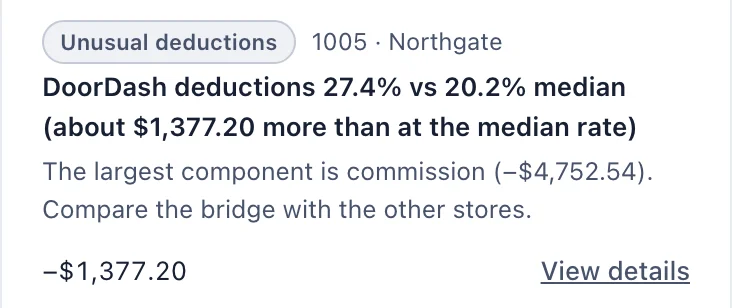
Where it shows: Marketplaces · stores listed under Needs attentionOn the demo company, one store’s DoorDash deductions read 27.4% against a 20.2% median, with commission named as the largest component.Marketplaces, step by step
02 · Loss counted twice
Is our loss total counting anything twice?
What stood out
Refunds, cancelled orders and voided orders each had their own line, and our own loss total added them together. The refund line turned out to be the cancelled and voided orders again, with sales tax on top.
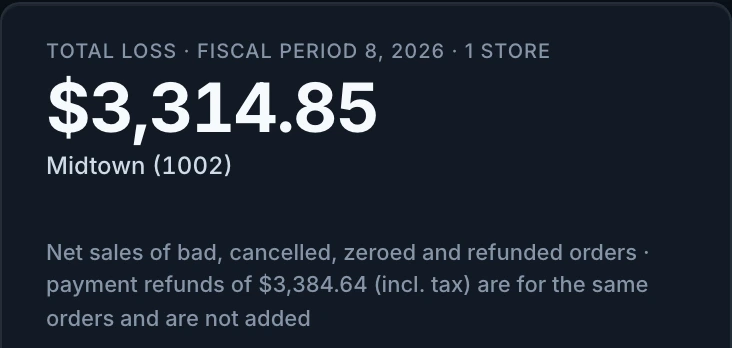
Each refund was money returned for an order that was already in our loss total as cancelled or voided, so each of those orders was in the total twice. The Loss and Refunds screen now prints payment refunds beside the total, says they are for the same orders, and does not add them.
The next check
Read refunds beside the loss total, not on top of it. Then look at which days carry them.
Where it shows: Loss and Refunds · one store’s total for a fiscal periodOn the demo company: a total loss of $3,314.85, with payment refunds of $3,384.64 printed under it as the same orders and not added.Loss and Refunds, step by step
Actual OpsIntel screens · invented data for an invented company, not our own stores
In our own restaurants
Two more, from our own books.
These two are our experience as operators, and the reason accounting is part of OpsIntel.
03
In our own restaurants
Labor read on three bases did not rank our stores the same way.
In our own restaurants we can read labor from three places: the wages on the store’s time clock, the labor booked in our accounting ledger, and the labor line on the franchise P&L. Each carries something the others leave out, and the three did not put our stores in the same order. On the ledger, one store looked highest because a supervisor who covers several stores had their whole salary booked to it. So before we call a store high on labor, we say which labor we mean.
04
In our own restaurants
Our books and our franchise reporting did not agree on every line.
In our own restaurants we set the P&L from our books beside the operating P&L from franchise reporting, for the same periods. Some lines did not agree, and each difference was something to check with our bookkeeper before we acted on either figure. It is why OpsIntel integrates with accounting software: the complete numbers give the correct operating targets.
Every week
How we use OpsIntel
Each week our system sends a weekly review built from these same screens: what changed, where cost built up and what to check first. Nobody downloads a report to write it.
When something needs attention, such as a time-clock pattern, a discount code used outside its rules, or cash and voids that do not line up, our system sends an alert with the store, the shift and the numbers behind it.