
Forecast
What should next week look like?
Forecast gives a projected close for the week in progress and a forecast for the next two, for all stores and for each one, beside last year’s matching fiscal week. Each likely range is measured by replaying the method on your own closed weeks.
How it works
How you work through it.
See this week’s projected close and the next two weeks.
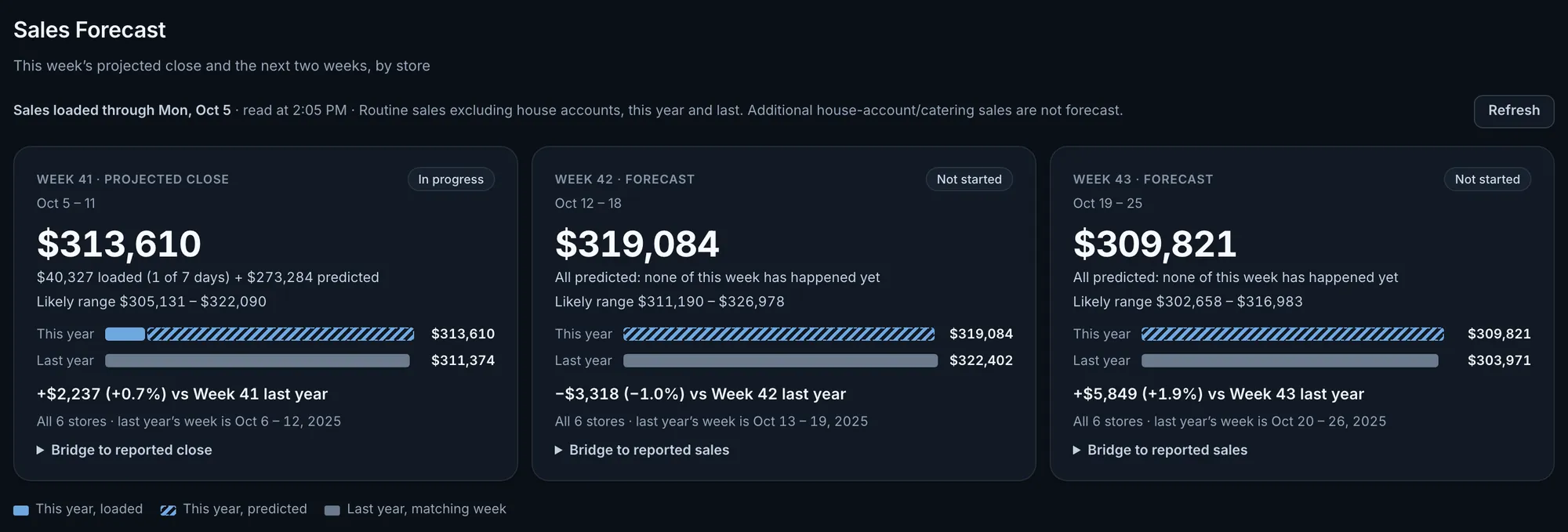
For the week in progress, sales already loaded plus a prediction for the remaining days. For the next two weeks, a forecast. Each sits beside last year’s matching fiscal week, with last year’s dates printed, and carries a likely range once eight closed weeks can be replayed. A day of this week that has ended but not loaded is estimated and named, never counted as $0.
Fig. 1One day into the week: $40,327 loaded, $313,610 projected, likely range $305,131 to $322,090.Actual OpsIntel screen · synthetic demo data Read both years with house-account orders taken out.
Orders billed to a house account are taken out of this year and last year and are not forecast. A one-off account order, or an account that ended, does not move the forecast or the comparison. For the week in progress, a bridge adds the house-account sales already loaded to the forecast to give the projected reported close. This needs house accounts that can be separated for every store. Where they cannot, every store is on reported sales and the page says so.
Compare each store with last year.
Every store’s three weeks, with last year’s matching fiscal week and the change in dollars and percent under each figure. Each all-store forecast is the sum of the store forecasts under it, apart from rounding to the dollar. A store with no forecast is named and left out of the total.
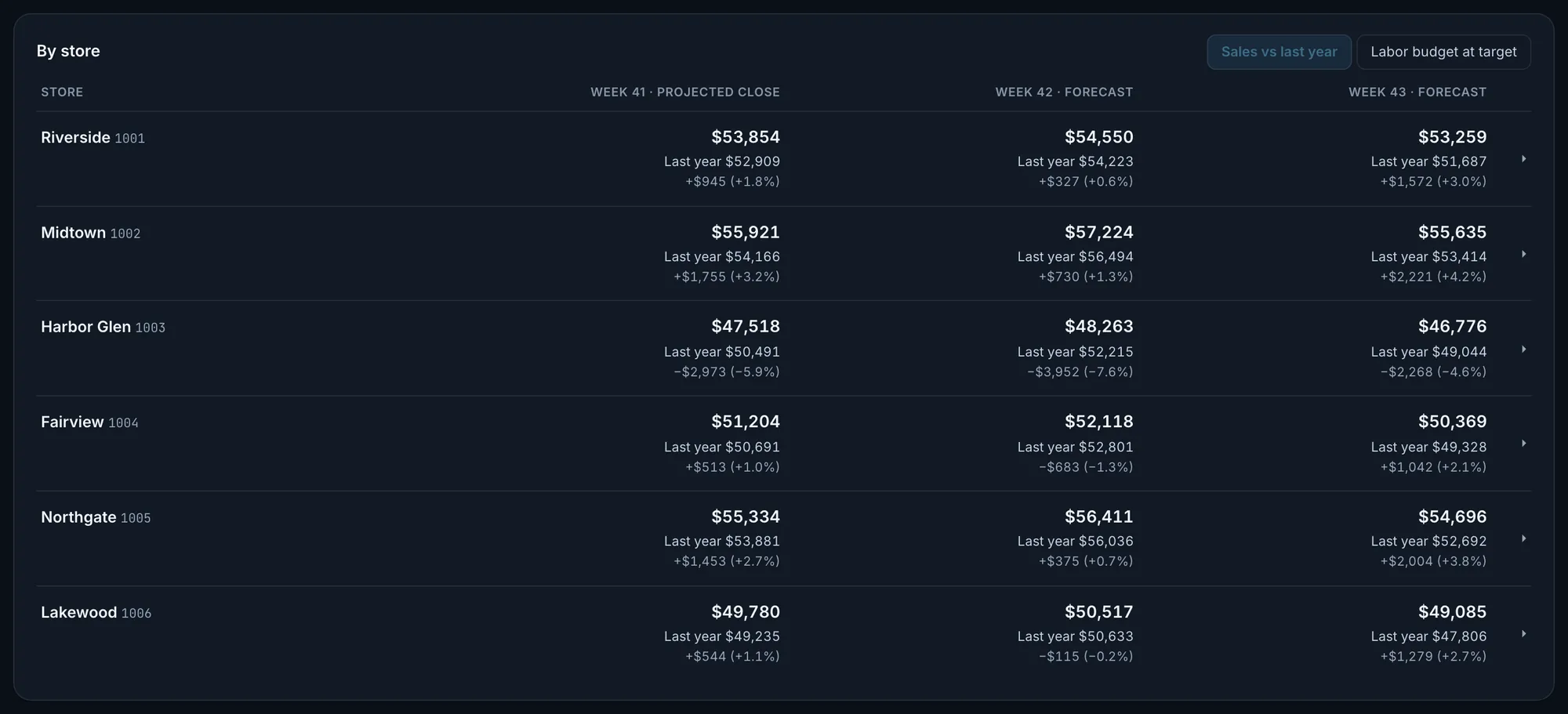
Fig. 2Harbor Glen is the only store forecast below last year in all three weeks.Actual OpsIntel screen · synthetic demo data Open a store to see how its number is made up.
A store’s number is the average of two estimates, one from last year’s shape and one from recent weeks, and both are shown. The detail also has eight recent weeks beside last year and all 21 days: what has loaded, what is predicted and last year’s same weekday. A new store gets a forecast from its recent weeks alone and is labelled that way, with no last-year comparison and no range until it has the history for one.
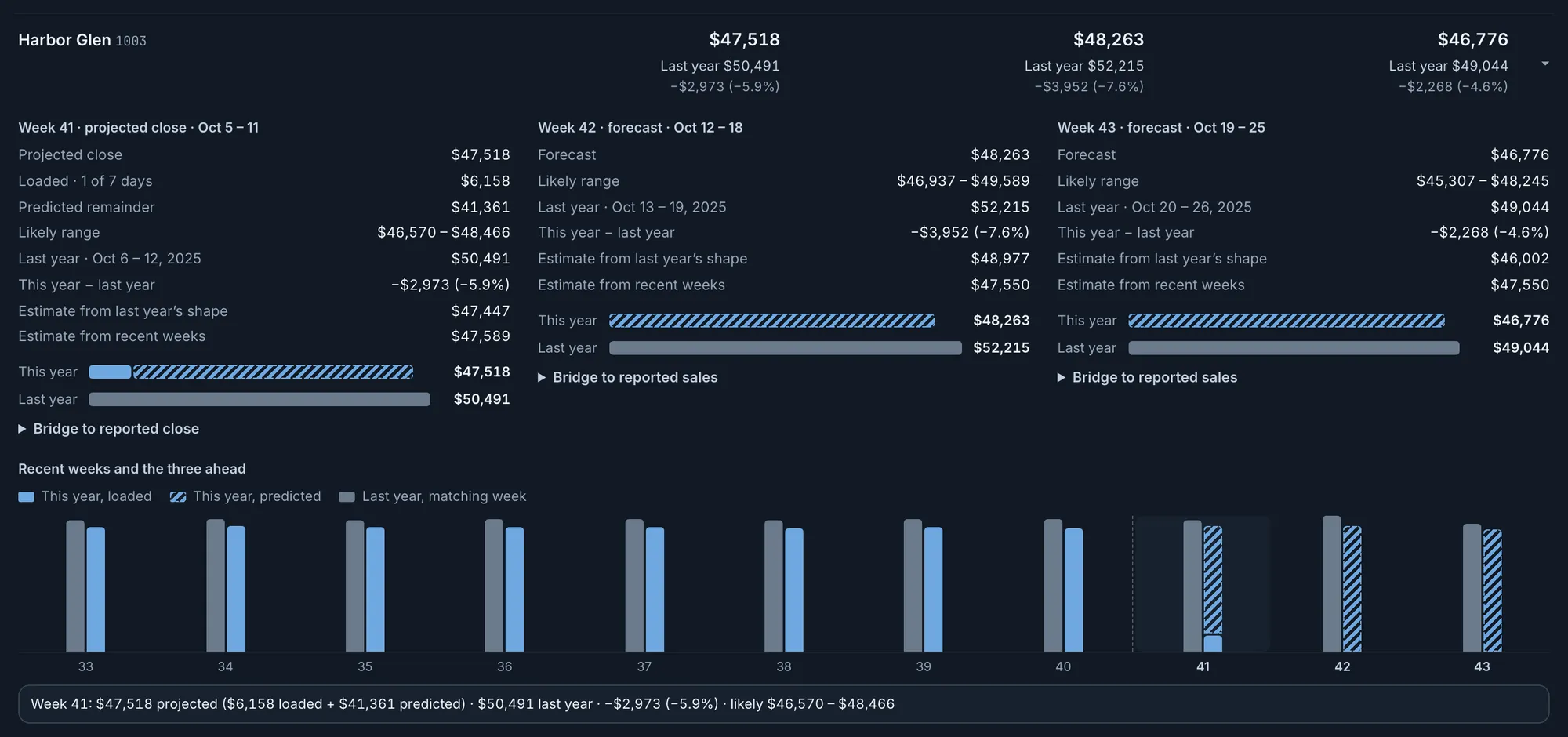
Fig. 3Harbor Glen, Week 41: $47,447 from last year’s shape and $47,589 from recent weeks average to $47,518.Actual OpsIntel screen · synthetic demo data See the hours and dollars each store’s labor target pays for.
Switch the store table to labor and each week shows the hours and dollars your labor target pays for at the forecast, beside the hours the store recently worked. A flag marks a week where the target’s hours fall below the store’s leanest week of the last thirteen. Open a store for the arithmetic of each week.
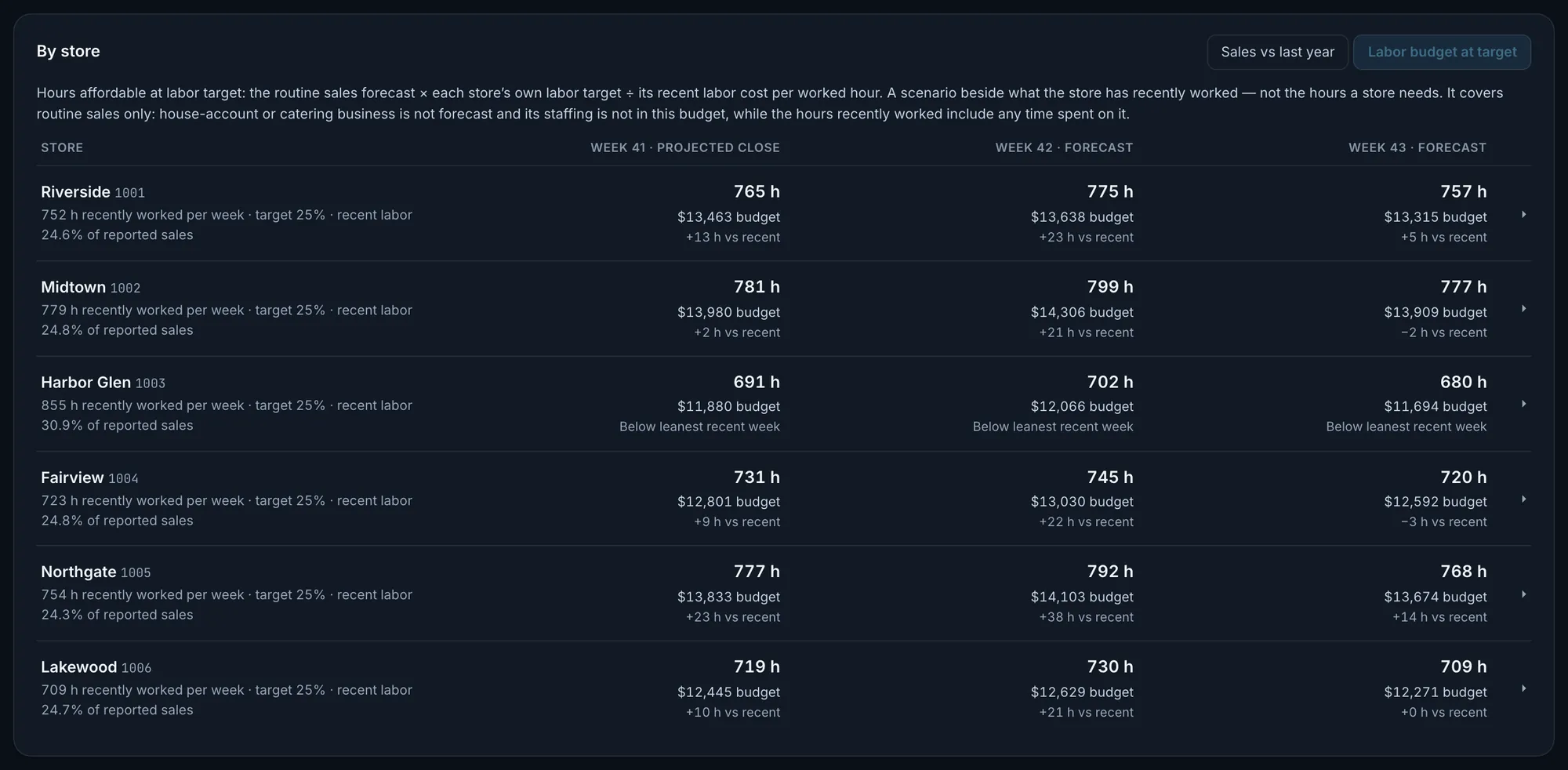
Fig. 4Harbor Glen recently worked 855 hours a week; its 25% target pays for 691 at the Week 41 forecast, below its leanest recent week.Actual OpsIntel screen · synthetic demo data Read how the forecast is built and how its range is measured.
The page states the method in plain words and lists what it does not know: promotions, weather, closures and events. The likely range comes from replaying that method on up to thirteen closed weeks, each from the day its forecast would have been made. It is the miss the method stayed within in about four weeks of five. Each week’s range is replayed at its own distance: this week’s with the same number of days loaded as today, the next two from one and two weeks ahead.
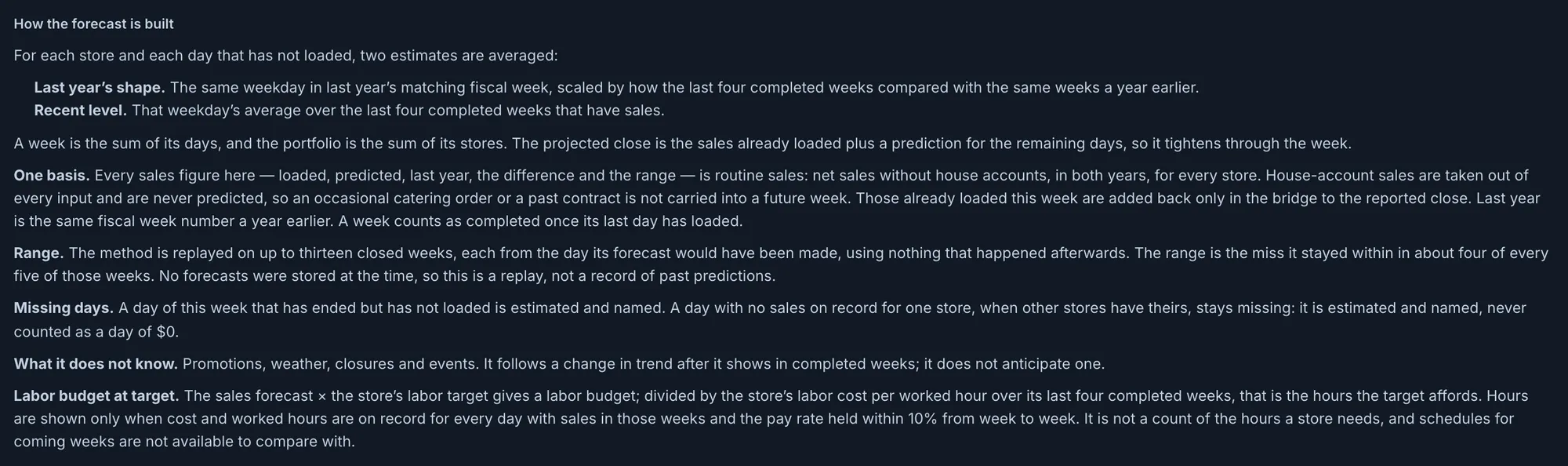
Fig. 5Actual OpsIntel screen · synthetic demo data Check the method against weeks that have closed.
Open a store that has a range and its detail prints how close the replay landed for next week’s forecast, in a typical week and in about four weeks of five. For all stores together, the page replays the method on the last completed week: what it gives a week ahead, what the week closed at, and the gap in percent. This check is a replay, not a stored forecast, and it shows when every store can be replayed for that week.
What it covers
Forecast at a glance.
Forecasts for each store: this week and the next two, with a likely range measured on your own closed weeks.
In Forecast
- A projected close for the week in progress
- A forecast for the next two weeks, for all stores and each one
- Last year’s matching fiscal week beside each
- A likely range measured on your own closed weeks
- House-account orders taken out of both years
- The hours and dollars each store’s labor target pays for
Before a demo
Worth knowing first.
- It covers three weeks: the one in progress and the next two.
- Sales here leave out house accounts, so they differ from reported sales on other screens by that amount. If house accounts cannot be separated for every store, every sales figure uses reported sales and the page says so.
- A new store needs two completed weeks of sales to get a forecast. The all-store range is not shown until every store has the history for one.
- A closed day with nothing on record is estimated as a normal day until a zero is recorded.
- The labor view is a budget, not a schedule, and no schedule is set beside it. It needs a labor target for the store, and hours show only when the last four completed weeks have labor cost and worked hours for every sales day at a steady pay rate.
- Forecast is part of the Premium plan.
Related
Read it beside these.
Actual OpsIntel screen · synthetic demo data Labor
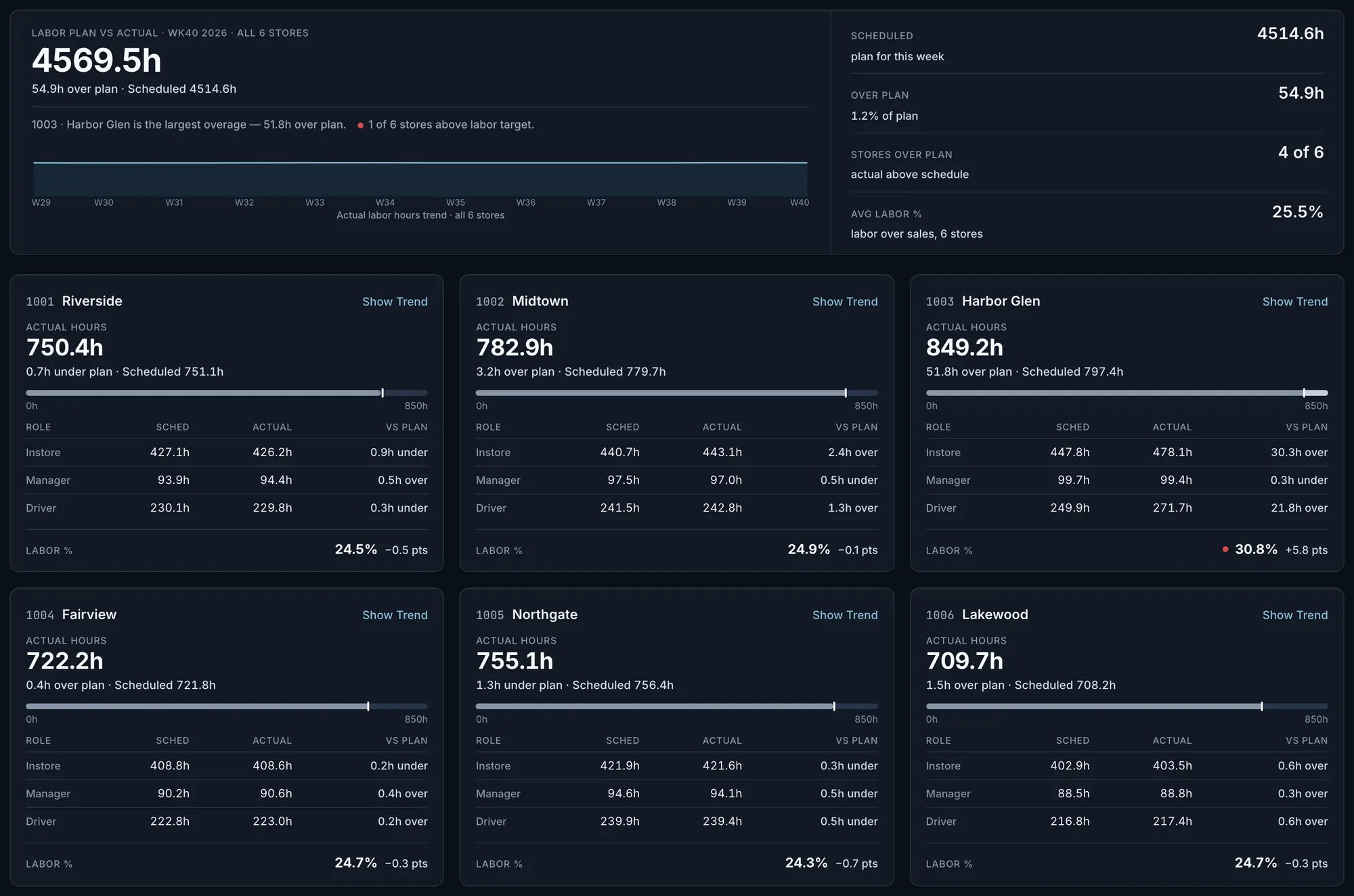
Labor waste and overtime hours by store and day, with deliveries and guest experience matched to shifts.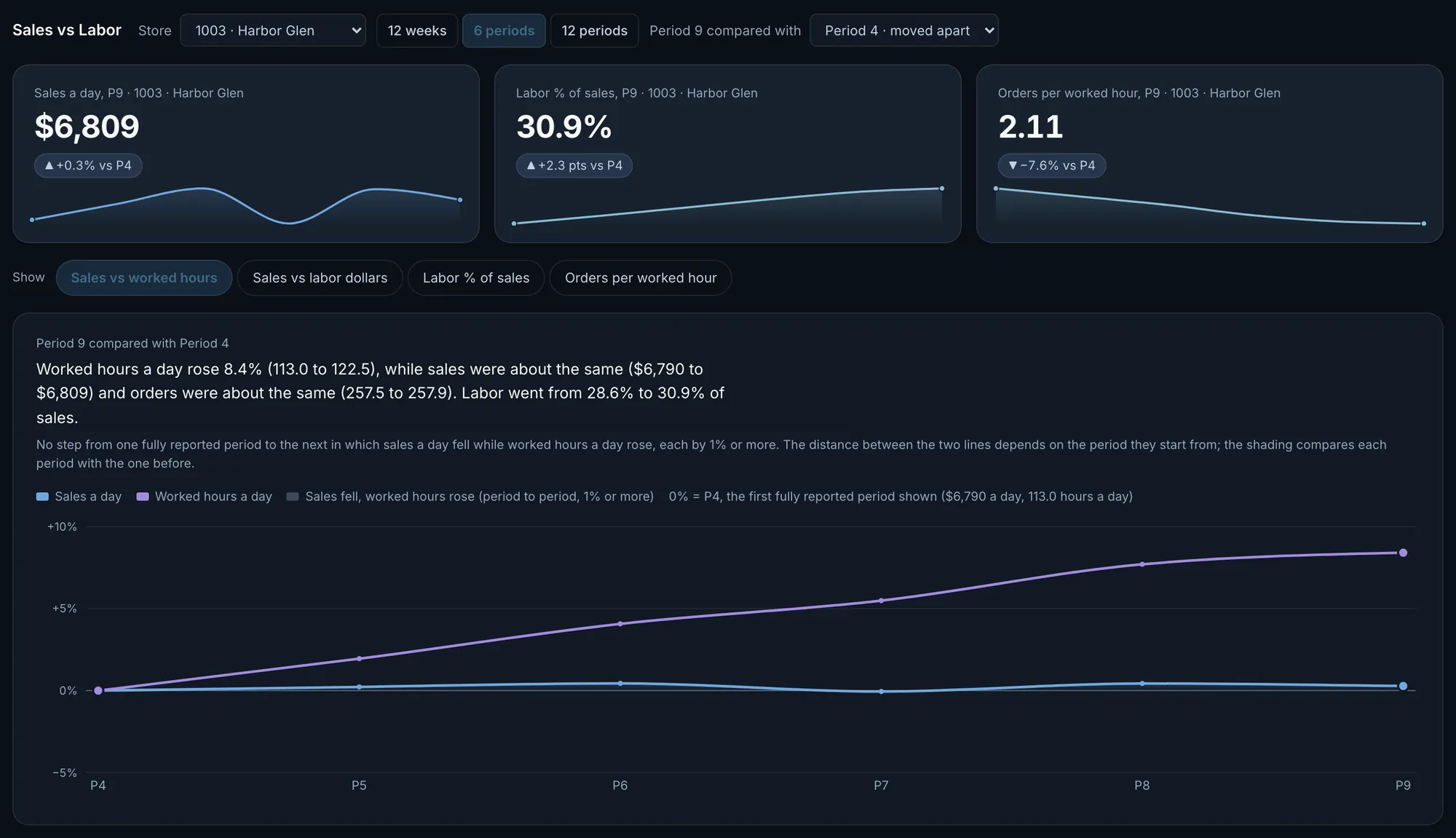
Actual OpsIntel screen · synthetic demo data Trends
See where the graphs are falling: sales, hours, channels, discounts and delivery times against the last few months.