Overview
Which store needs me first?
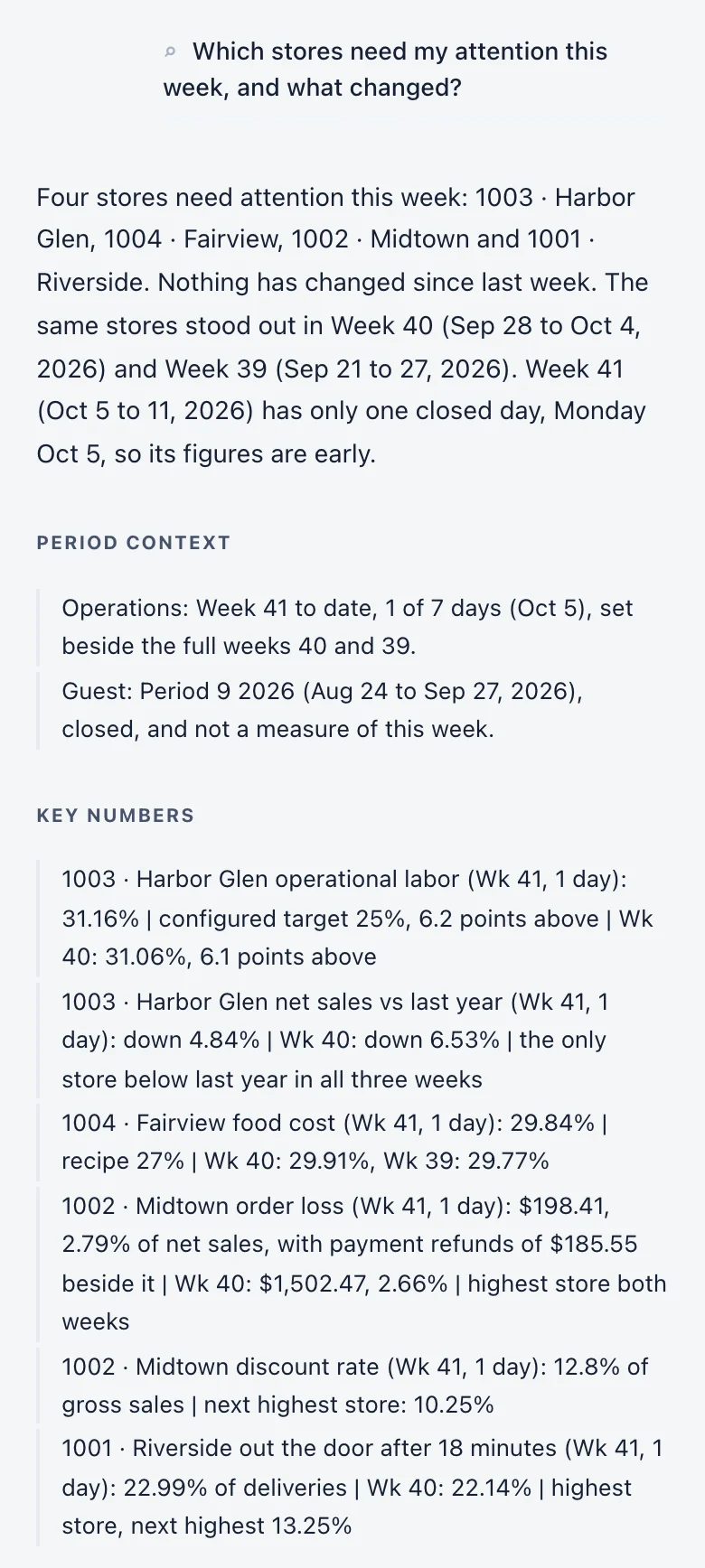
The Overview puts every store on one page: sales against last year, labor and food cost against each store’s own target, voids, cash and out-the-door times. It opens on yesterday, with the alerts our system raised on top and a health score out of 100 for the last closed period.
How it works
How you work through it.
Start with the day.
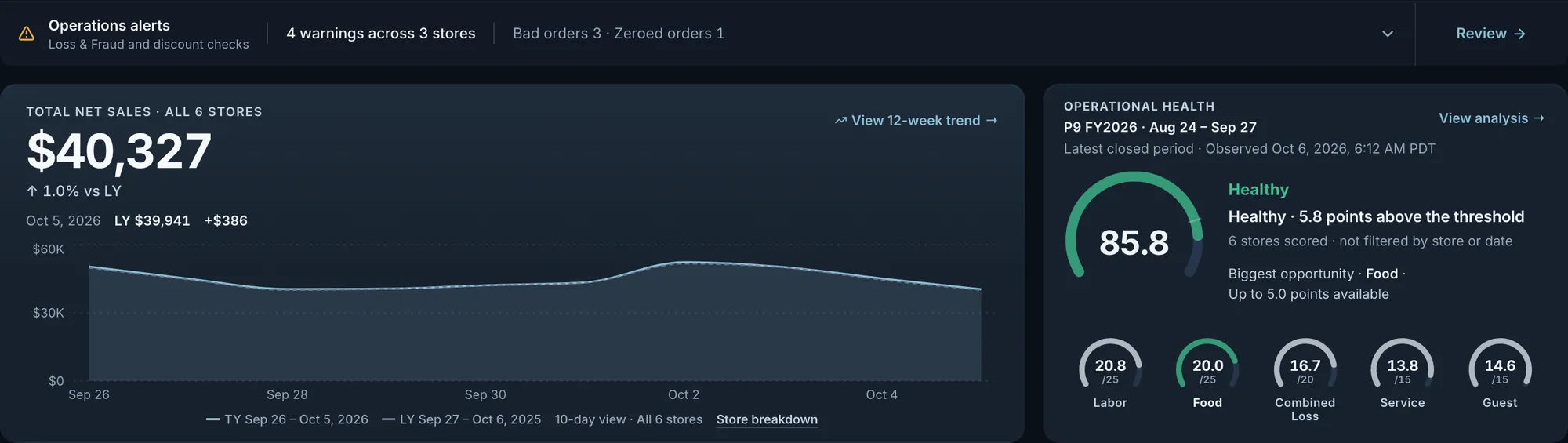
A row at the top checks each selected store for bad orders, zeroed orders and use of the manager discount code over the dates on screen. Under it sit total sales against the same weekday last year and a health score for the last closed period. In the day view, a store whose online ordering was unavailable shows for how long, beside the sales total and on its card.
Fig. 1Sales are up 1.0% over last year, with 4 warnings across 3 stores.Actual OpsIntel screen · synthetic demo data Check the stores together against target.
Under the sales chart, a strip gives labor, food cost and FLM for the stores together and counts how many stores are on target for each. FLM is food, labor and delivery mileage together, as a share of sales. The group figures are dollars over sales, so a small store does not count the same as a large one.

Fig. 2Labor for the stores together is 25.6%, with all but one store on target.Actual OpsIntel screen · synthetic demo data See which stores are off target, and by how much.
Each store has a card: sales against last year, then labor, FLM and food cost with the gap to that store’s own target in points. Below those are voids with their dollars, cash over or short, average out-the-door time against last year, and the share of timed deliveries that took 18 minutes or more, with the count behind it.
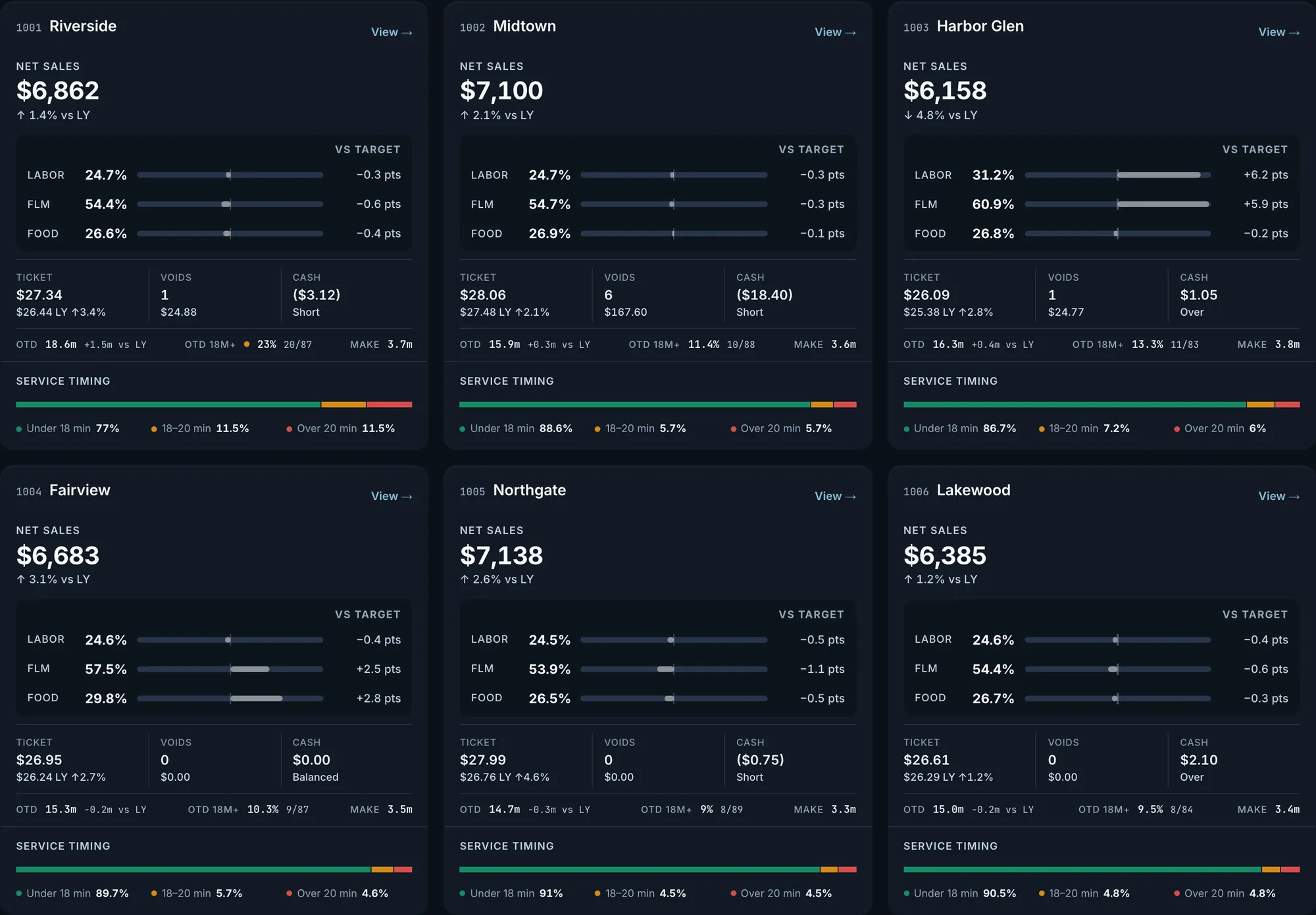
Fig. 3Harbor Glen is 6.2 points over on labor and Fairview 2.8 over on food cost. At Riverside, 20 of 87 timed deliveries took 18 minutes or more.Actual OpsIntel screen · synthetic demo data Open a store card for the detail behind it.
View on a card opens that store’s detail: online, carryout and dispatched orders, each daypart’s share of sales against its share last year, each marketplace, voids and discounts, cash paid in and out, and delivery timing from make time to drive time. Marketplace figures are register sales, not platform payouts.
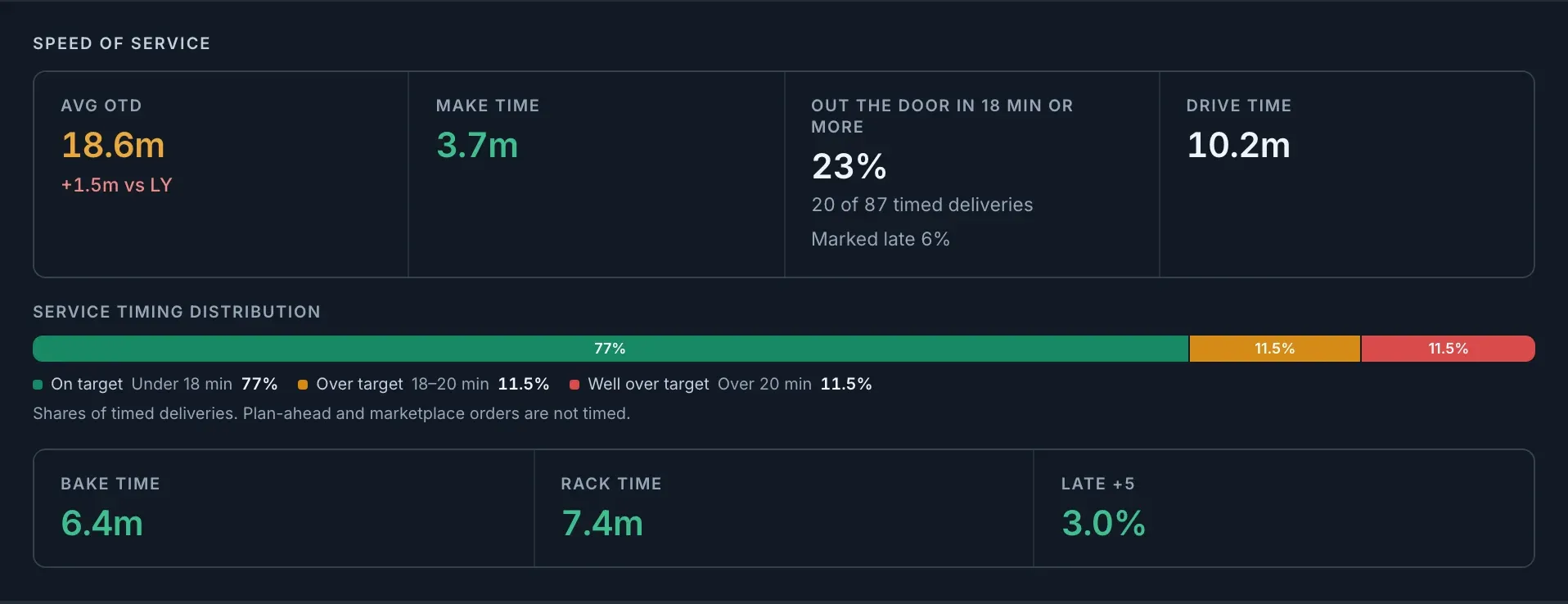
Fig. 4Riverside: 20 of 87 timed deliveries took 18 minutes or more to leave, and average out-the-door time was 1.5 minutes slower than last year.Actual OpsIntel screen · synthetic demo data See where a sales change came from.
The store breakdown prints the dates being compared, then each store’s sales this year and last with the dollar change, largest decline first. Under it, orders and average order value for both years show whether order count, order value or both moved. For a day or a week the same change can be split by channel.
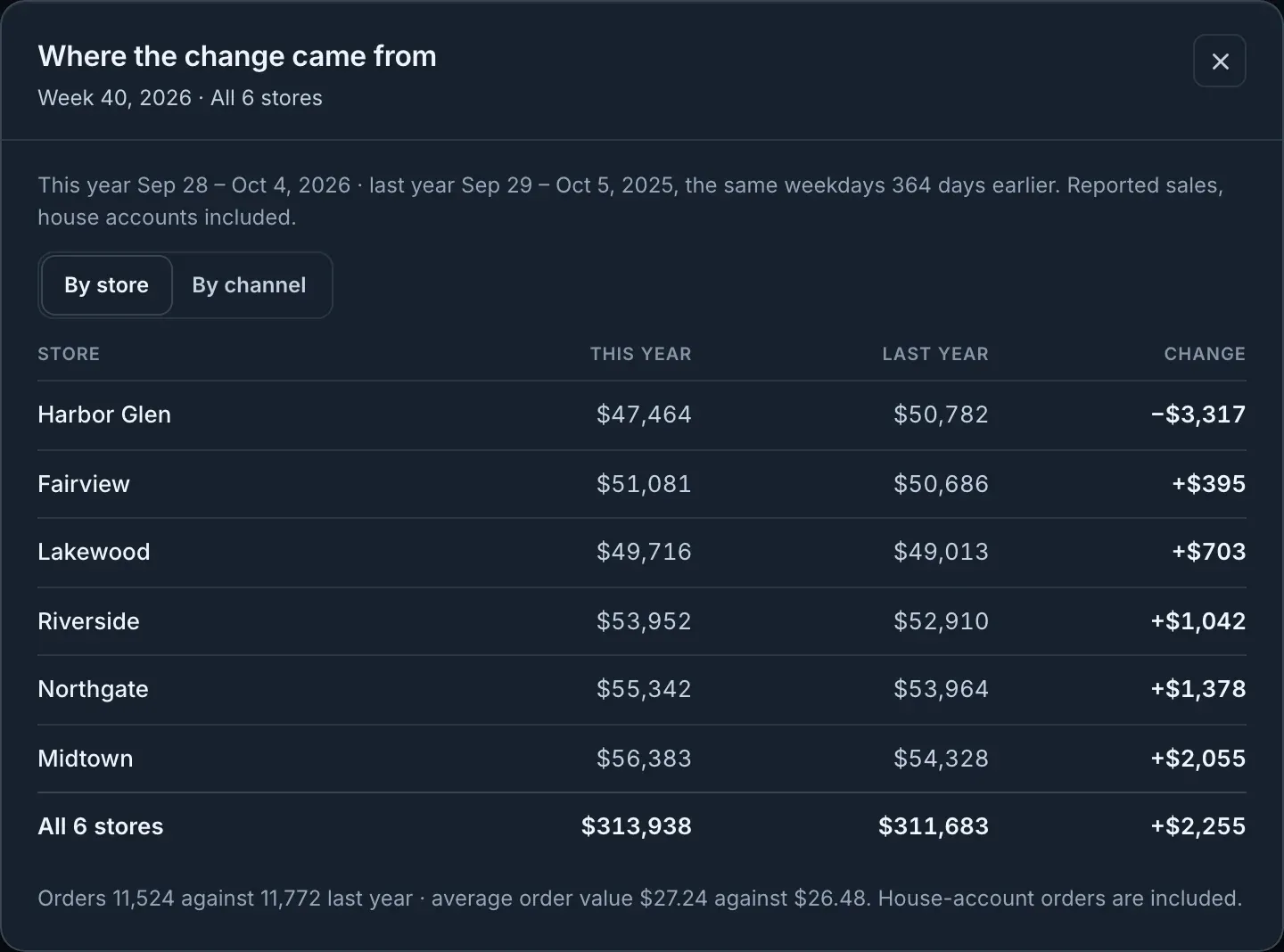
Fig. 5Week 40: the stores together are up $2,255 on the same weekdays a year earlier. Harbor Glen is down $3,317.Actual OpsIntel screen · synthetic demo data Split one store’s change by channel.
Select a store and switch the same breakdown to By channel: sales from orders placed directly with the store, DoorDash, Uber Eats and other channels, each this year and last with the change in dollars and percent. The rows are shown only when they add up to the store’s reported sales.
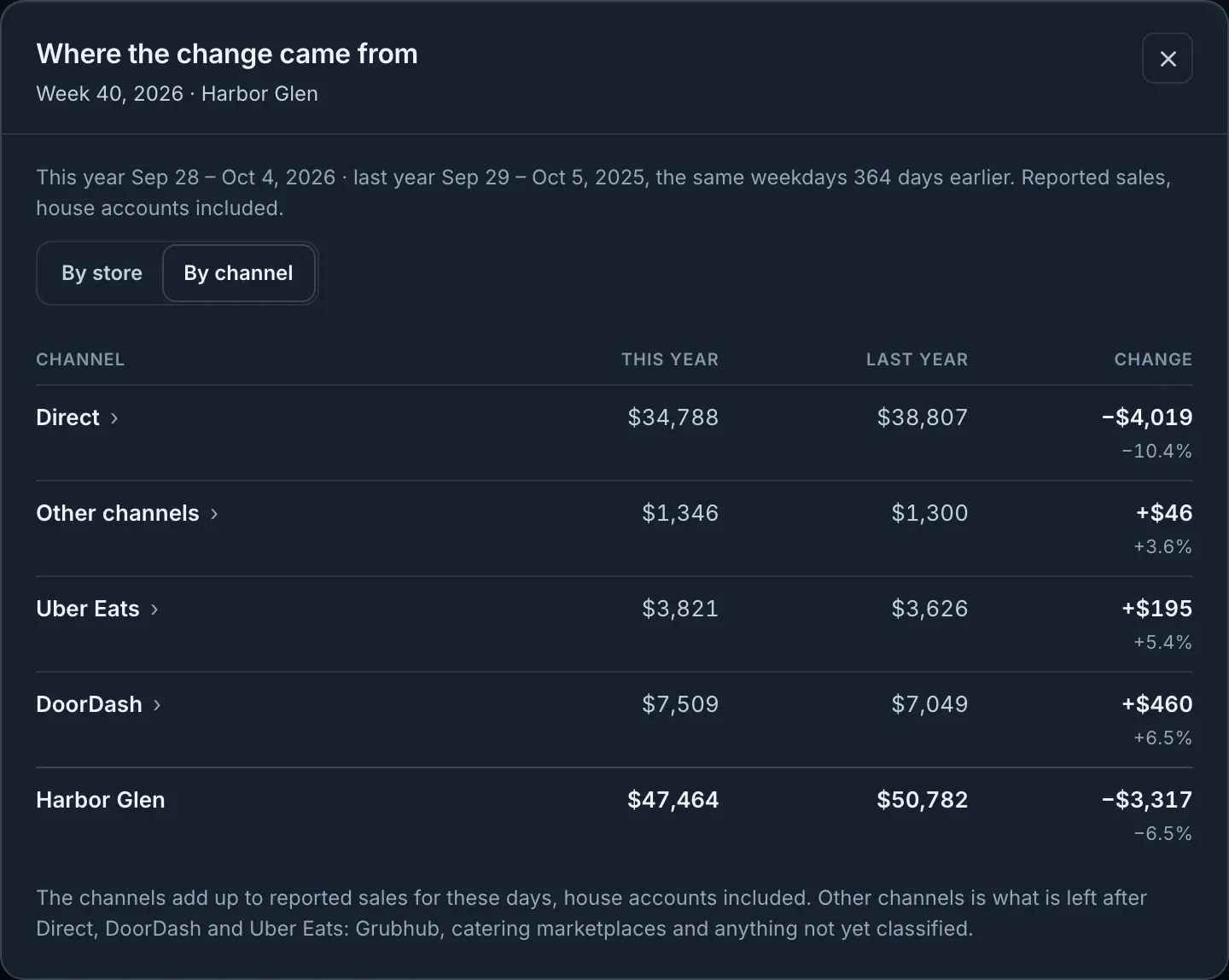
Fig. 6Harbor Glen, week 40: direct orders are down $4,019 while DoorDash and Uber Eats are up.Actual OpsIntel screen · synthetic demo data Rank the stores on the last closed period.
The health score opens into a ranking: every store scored out of 100 for the last closed period. The same screen prints the period’s dates, the time the figures were read, and the dollars behind labor, food cost and order loss.
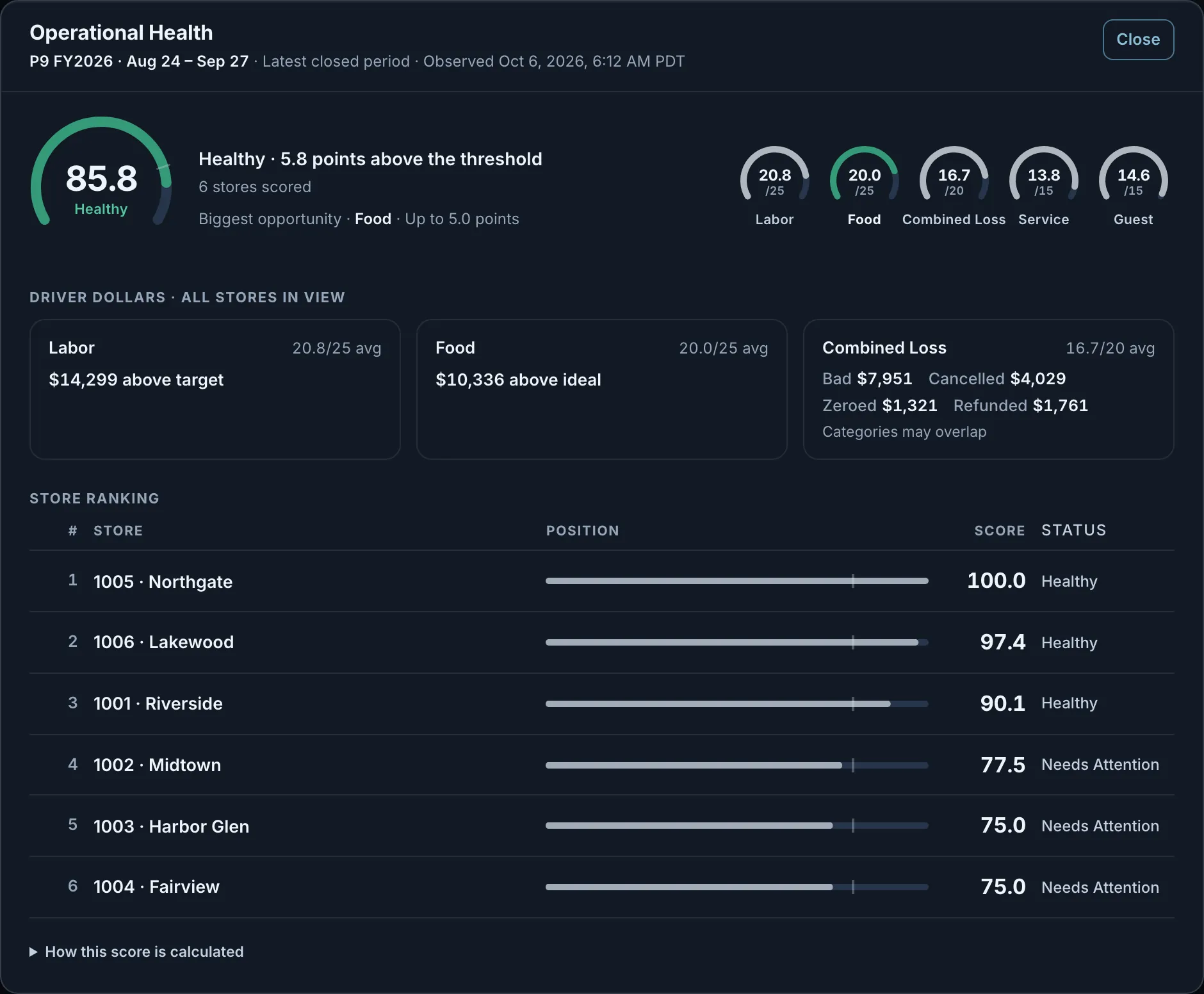
Fig. 7The stores together scored 85.8. Labor ran $14,299 above target for the period and food cost $10,336 above recipe ideal.Actual OpsIntel screen · synthetic demo data Open a store to see what pulled its score down.
Each of the five parts shows the points it earned, the figure behind it and how far it is from its target or line, with dollars for labor, food cost and order loss. The part to work on first is marked with the points available. Underneath, the scoring rules list what each part is worth and the line it has to meet, such as labor at or under the store’s target and an average out-the-door time of 18 minutes or less.
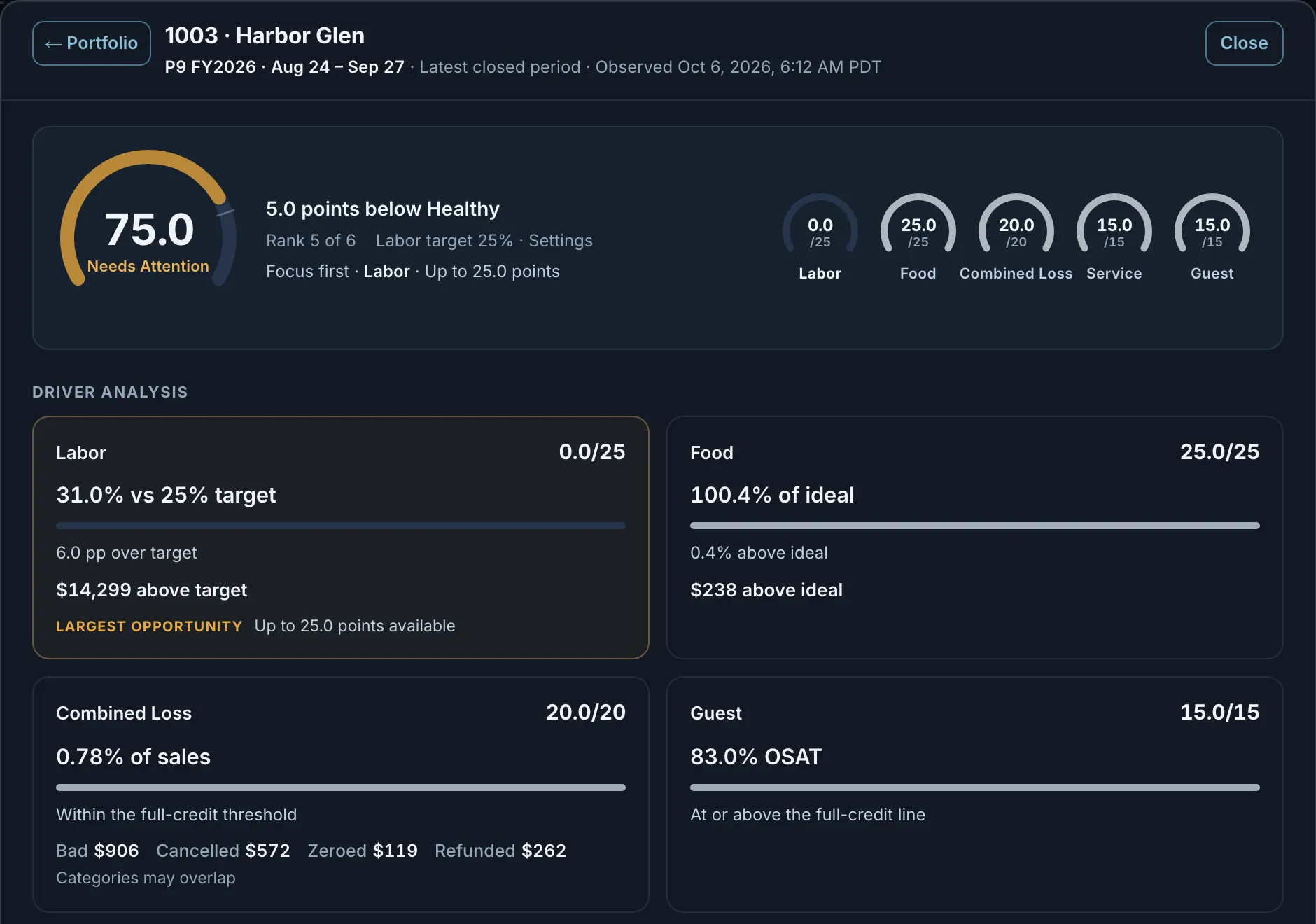
Fig. 8Harbor Glen: labor ran 31.0% against a 25% target, $14,299 above target for the period, and earned 0 of 25 points.Actual OpsIntel screen · synthetic demo data Go from a warning to that store’s loss figures for the same dates.
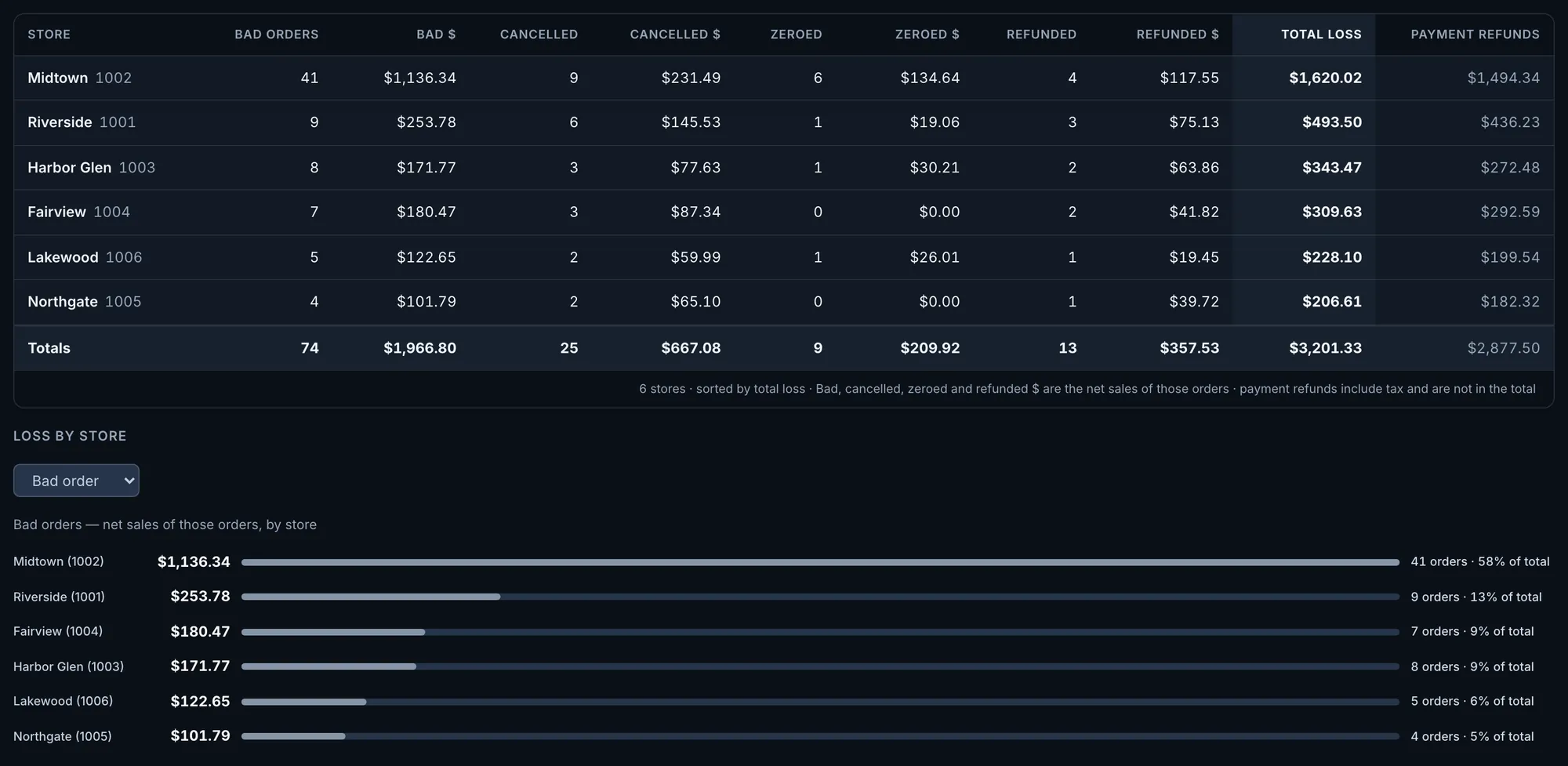
Each warning names the store and counts the orders affected. From the row you open Loss and Refunds for the same dates, with that store’s counts and dollars.

Fig. 9Midtown has 6 bad orders and 2 zeroed orders to review.Actual OpsIntel screen · synthetic demo data See what has not arrived.
When sales, food cost, cash or an order check has not arrived, the Overview says so instead of printing a zero. The total says how many stores reported, food cost reads Not posted, cash shows a dash, and a check that could not run says it is not an all-clear.
What it covers
Overview at a glance.
Every store on one page, against last year and against its own target.
In Overview
- Sales against last year, for every store
- Labor and food cost against each store’s own target
- Voids, cash and out-the-door times
- The alerts our system raised, on top
- A health score out of 100 for the last closed period
- Where a sales change came from, channel by channel
Before a demo
Worth knowing first.
- Warnings cover bad orders and zeroed orders for the day, week, period or year on screen. A critical line marks any use of the manager discount code. A store over on labor or food cost shows the gap on its card and is not a warning.
- A warning leads to counts and dollars. The orders themselves are listed only on the Premium plan, for weeks that have order detail.
- The health score is always for the last closed period. The day and the stores you pick do not change it, and earlier periods are not shown. What each part is worth and the line it has to meet are the same for every customer and cannot be changed.
- A store is scored only when all five parts can be worked out for the period. When one cannot, the store shows as Unscored and the screen names the part and the reason, such as no labor target set or fewer than five guest surveys. Labor or food cost missing on a day the store had sales is shown with the dates. The gap is never filled and the other parts are not reweighted.
- Owners and admins set each store’s labor and FLM targets in Settings. The food cost target comes from your franchise reporting and cannot be edited.
- Out-the-door time runs from the order to leaving the store, not to the customer’s door. Plan-ahead and marketplace orders are not timed.
- The Overview opens on yesterday, the last full day, worked out on Pacific time. It reads your reporting system directly, not a stored copy, and Refresh reads it again. A week, period or year still running is shown to date and says so. It is not a live feed.